API overview
Call the AgentConnect REST API with a personal API key to list agents, read sessions, and trigger schedules from scripts and CI.
| Base URL | https://test-api.agentconnect.md/v1 |
|---|---|
| Release | v2.18.0-rc.12 |
| OpenAPI document | Download openapi.json (OpenAPI 3.1.0, 330 paths) |
The console runs on a REST API at https://api.agentconnect.md, and you can call those same endpoints directly. On AgentConnect OSS, the bundled stack serves this API at <your-control-plane-url>/api/v1. A personal API key authenticates as you, with your role, in one organization.
Create a key
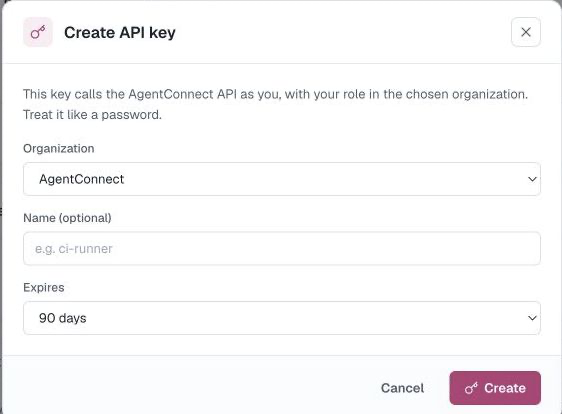
Go to Profile → API keys → New key and fill in the fields:
- Organization: the org this key is scoped to.
- Name: optional label (for example,
ci-runner). - Permission: what the key can call:
- Full access: everything your role allows.
- Read-only:
GETroutes, plus the MCP connector read tools. - Agent chat: only the relay's agent chat endpoint, limited to the selected agents. See Agent chat API.
- Agents: All agents or Selected agents. This setting applies only to Agent chat.
- Expires: 30, 60, or 90 days, 1 year, or never (90 days by default).
The key is shown once, so copy it right away. After that, the list only displays the trailing characters, expiration date, and last-used time.
You can only manage keys from the console. API keys can't list, create, or revoke keys, or create or delete an organization. Requests to those endpoints return 403.
For a server your organization runs, issue the key to a service account instead. Settings → Service accounts → Keys has the same options, without the organization picker.
Use it
curl https://api.agentconnect.md/v1/orgs \
  -H "Authorization: Bearer $AGENTCONNECT_API_KEY"
Every resource is scoped to an organization under /v1/orgs/{orgId}/…. You can list agents, read session metadata and messages, manage schedules, and trigger runs. Each operation is listed in the sidebar with an interactive playground, and the raw OpenAPI spec is linked in the table above.
Because the key uses your role, a Viewer key can read data without modifying anything, which works well for dashboards.
You can also use the same key to authenticate the MCP connector in headless clients. Pass it in the Authorization: Bearer header to skip the browser OAuth flow.
Revoke
Revoke invalidates a key immediately, and any client still using it starts getting 401 responses. To rotate a key without downtime, create a new key first, update your scripts, and then revoke the old one.
Other credentials, for completeness
- Daemon keys: generated by Add daemon to authenticate a machine, not a person. Shown once in the install command and revoked when you delete the daemon.
- Bot tokens: issued by the chat platforms. See Bots.
How is this guide?