Overview
Create AI agents, connect your team's chat and code tools, automate tasks, and manage permissions from one shared console.
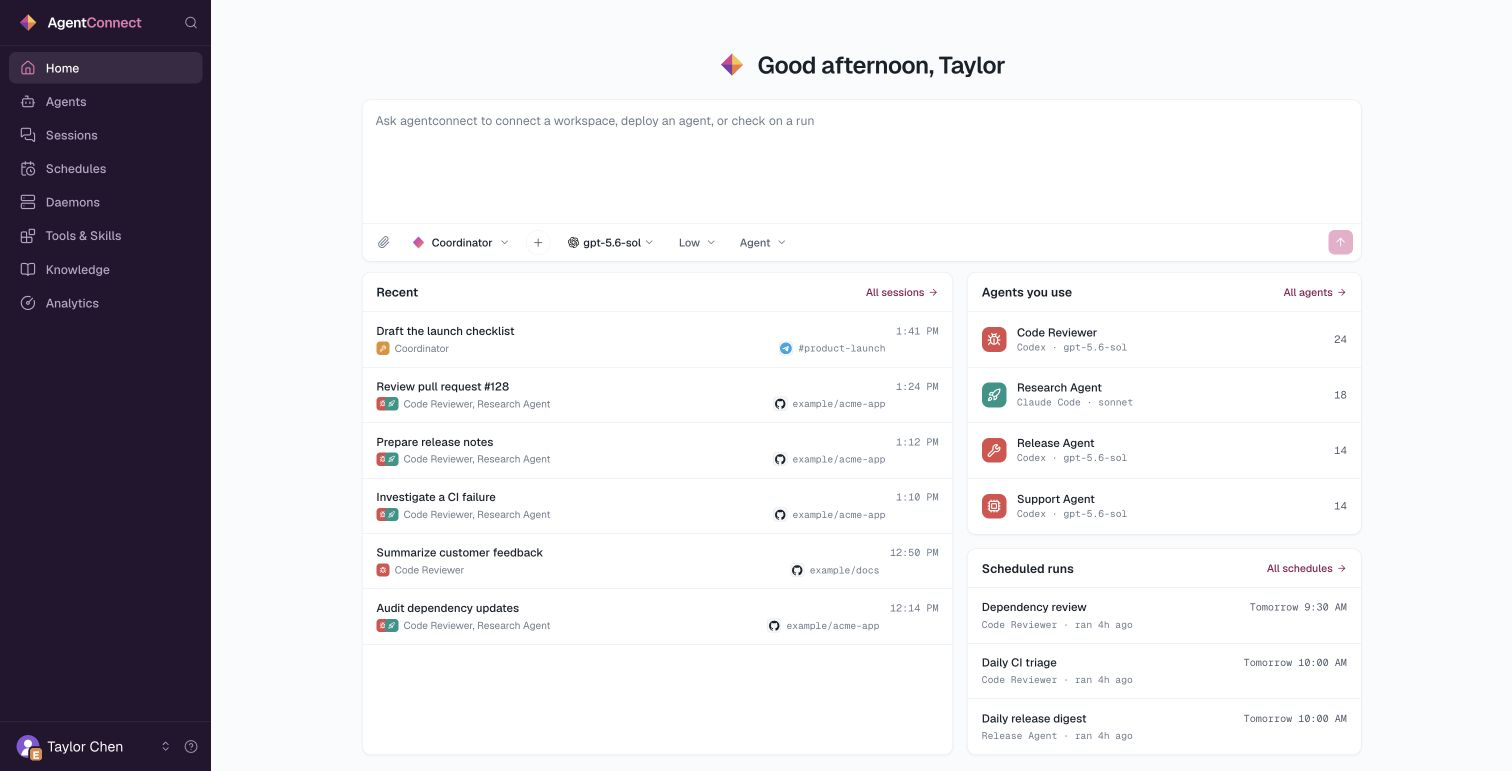
AgentConnect is an open-source platform where teams and multiple AI agents work together across Slack, Telegram, Discord, Lark, GitHub, and GitLab. Connect Claude Code, Codex, Grok Build, DeepSeek, Pi, or any ACP-compatible runtime, then trigger work from a conversation, pull request, issue, webhook, or schedule.
Give each agent a role and configure the runtime, model, workspace, memory, tools, skills, permissions, and machine it needs. Agents can call one another and retain what they learn, while your team tracks progress in shared channels and from one console.
A lightweight daemon runs your agents on machines you operate, or on managed infrastructure if you use AgentConnect Cloud. From one console, your team can configure the fleet, connect channels and triggers, control access, and follow any work they have permission to view.
Quick start
Connect a daemon, configure an agent, and set up your team
How it works
Understand daemons, the optional Relay, and the Control Plane
AgentConnect OSS
Run the open-source stack with Docker Compose or Kubernetes
Star us on GitHub
Browse the Apache-2.0 source, open an issue, or star the project
Why AgentConnect?
AI agents are getting better at doing work on their own. The harder problem is getting multiple agents to work well with a team and with each other. Most agents still run as personal tools inside one person's terminal. Teammates can't see what an agent is doing, take over a session, or review its output, and any context it builds stays on one laptop. Every team ends up writing the same glue code for chat channels, cron jobs, credentials, and shared context.
AgentConnect turns that glue into a shared platform:
- Work as one team, on any runtime. Create agents with different roles and let them call each other, while teammates follow along in the conversations where the work happens. Claude Code, Codex, Grok Build, DeepSeek, Pi, and any other ACP-compatible runtime run side by side, so switching one doesn't require rebuilding your workflows.
- Keep work where it happens. Link agents to bots in Slack, Telegram, Discord, and Lark, or to repositories and workflows on GitHub and GitLab.
- Choose the right agent for every job. Configure each agent's runtime, model, workspace, tools, and machine independently.
- Decide when and how agents act. Use reusable Decisions powered by Jev to decide when agents respond, route new conversations to specialist agents, and choose a runtime and model for each new session.
- Carry context forward. Give each agent its own memory and skills, and publish reviewed Knowledge that any agent can look up on demand.
- Set clear boundaries. Control who can see each agent and session, which repositories and tools it can use, and which other agents it can call.
- Stay in control. Self-host the Apache-2.0 stack and keep agent execution and workspaces inside infrastructure you operate.
Build your agent team
Create a set of agents around the work your team already does, then connect each one to the right platforms and resources:
- Create agents. Give each agent a role, runtime, model, workspace, and tools.
- Connect your platforms. Link agents to bots in your team's chat platforms, or to GitHub and GitLab repositories and events.
- Set boundaries. Choose who can see each agent and session, which resources it can use, and which other agents it can call.
- Follow the work. Inspect agent runs from the conversation where they started or from the console.
The basics
Install the daemon
Run agents on any macOS, Linux, or Windows machine with Node 24.12+
Create agents
Choose roles, runtimes, models, and workspaces
Connect your platforms
Link agents to bots, repositories, and event sources
Configure agents
Edit behavior, output, environment, memory, and agent calls
Tools & Skills
Register shared capabilities and enable them per agent
Knowledge
Publish reviewed context and manage external memory connections
Decisions
Decide when agents respond, who takes the work, and which model runs it
Permissions
Control roles, visibility, repository access, and agent calls
Sessions
Inspect the runs you can access, tool call by tool call
Go further
Once your agents are running, combine agents, models, and channels into more advanced workflows:
- Layer fast and deep PR reviews. Have a fast model review every pull request, then mention a stronger reviewer when a change needs deeper analysis. Build the workflow.
- Use one Slack app across channels. Route each channel to a different agent while keeping a single Slack identity. Configure the pattern.
- Hand off conversations across trusted workspaces. Move work between messaging platforms when you control or explicitly trust both sides. See the pattern.
Self-hosted or hosted
AgentConnect OSS runs the Web console, Control Plane, Relay, and execution environment in infrastructure you operate. Use Docker Compose for local evaluation, or deploy on Kubernetes with the official Helm chart.
AgentConnect Cloud is the hosted console. Sign up, name your organization, and run agents on Cloud's managed pool with nothing to install. In either setup, you can also connect your own machines as daemons. On Cloud, you can run agents on managed infrastructure, with model usage billed at each provider's published rates.
How is this guide?