Agent chat API
Put an agent behind your own chat UI, such as an Ask AI panel on a docs site or a support widget, using an API key and the AI SDK.
The agent chat API connects an agent to any chat UI built on the AI SDK's useChat hook (UI message stream protocol v1). Each turn is a single HTTP POST authenticated with your API key, returning a server-sent event stream. The Ask AI panel on this site uses this API.
Setting it up takes three steps:
- Add the API to the agent.
- Create an API key scoped to agent chat.
- Send turns to the chat endpoint with that key.
Choose a protocol
An agent's API supports three protocols, and you can enable more than one on the same agent. This page covers AI SDK UI. AG-UI provides the same chat flow for AG-UI clients, while AHP is built for clients that open the agent workspace directly, such as VS Code.
| AI SDK UI | AG-UI | AHP v1 | |
|---|---|---|---|
| Made for | Chat UIs built on useChat | Chat UIs built on an AG-UI client (such as CopilotKit) | Agent clients, such as VS Code |
| Transport | One HTTP POST per turn, returning an event stream | Same | One WebSocket for the whole connection |
| Endpoint | <relay-url>/ai-sdk/agents/<agent-id>/chat | <relay-url>/ag-ui/agents/<agent-id>/chat | wss://<relay-url>/ahp/agents/<agent-id> |
| Credential | An Agent chat or Full access key | Same | A Full access key, or sign-in from the client |
| Reply and thinking | Yes | Yes | Yes |
| Tool calls | Title and status | Title and status | Input and output |
| File edits | Not shown | Not shown | Before and after, as a diff |
| The agent's files | No | No | Read-only |
| Questions and approvals | Caller answers | Not forwarded to the caller | Caller answers |
| Sessions | Caller tracks the conversation ID | Caller tracks the thread ID | Listed, including earlier turns |
| Stopping a turn | No (closing the request leaves it running) | No (same) | Yes |
| A dropped connection | Rest of the turn is only in the console | Same | Reconnect and keep reading |
| Message input | Text of the last message | Same | Text and one image |
Use AI SDK UI or AG-UI when putting an agent behind your own chat UI. Each turn is a single request, and an Agent chat key only allows chatting. Use AHP when the client needs to inspect the agent's full work (tool inputs and outputs, file diffs, and files) in addition to its replies.
An AG-UI request uses a RunAgentInput payload where threadId identifies the conversation. Tool activity, plans, and notices arrive as ACTIVITY_SNAPSHOT events, and the session title arrives as a CUSTOM event named session_info. Keys, limits, and error responses are the same as described on this page.
Add the API to the agent
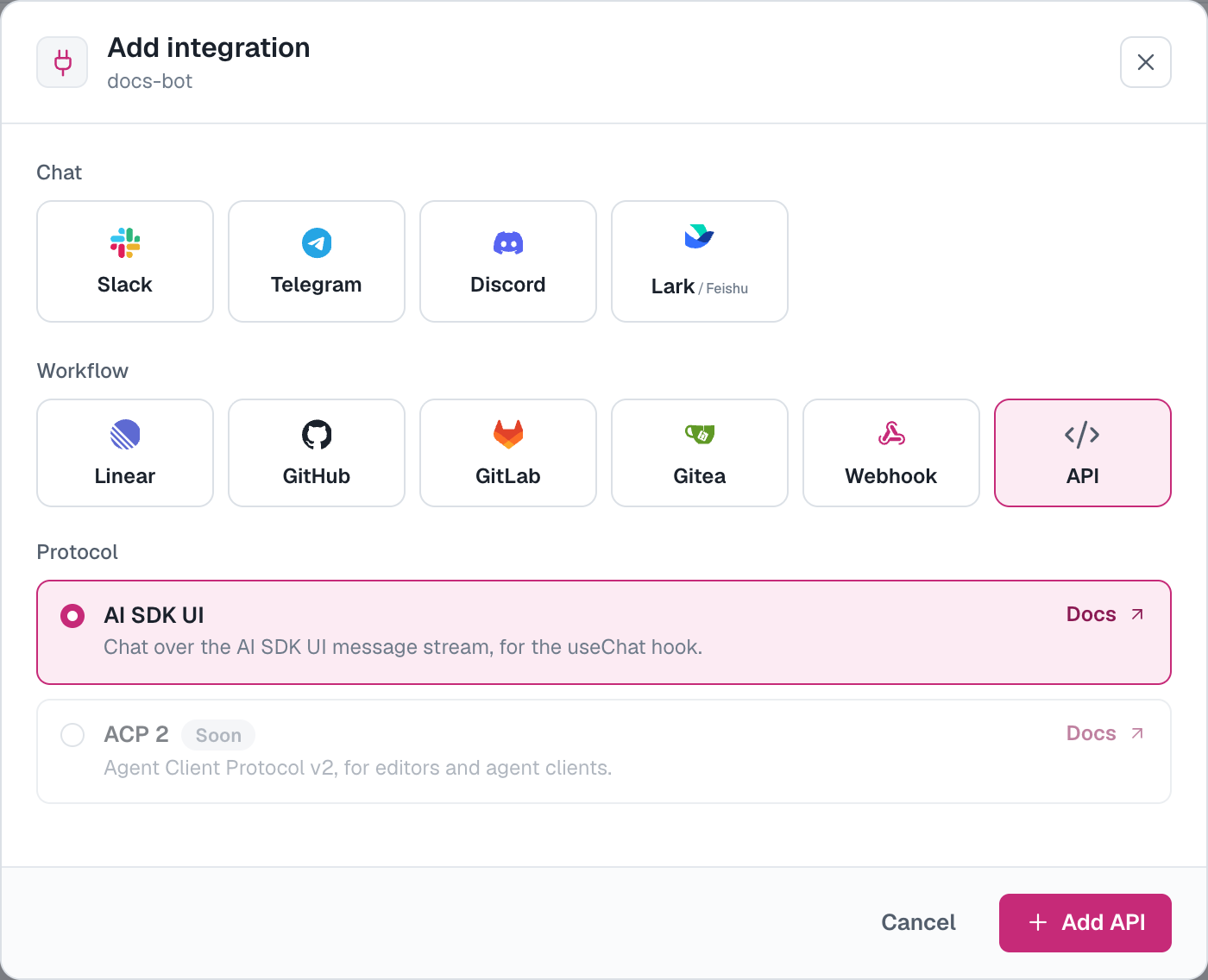
An agent only accepts API calls after its owner enables the API. Open the agent, go to Integrations → Add integration, select API under Workflow, choose AI SDK UI, and click Add API.
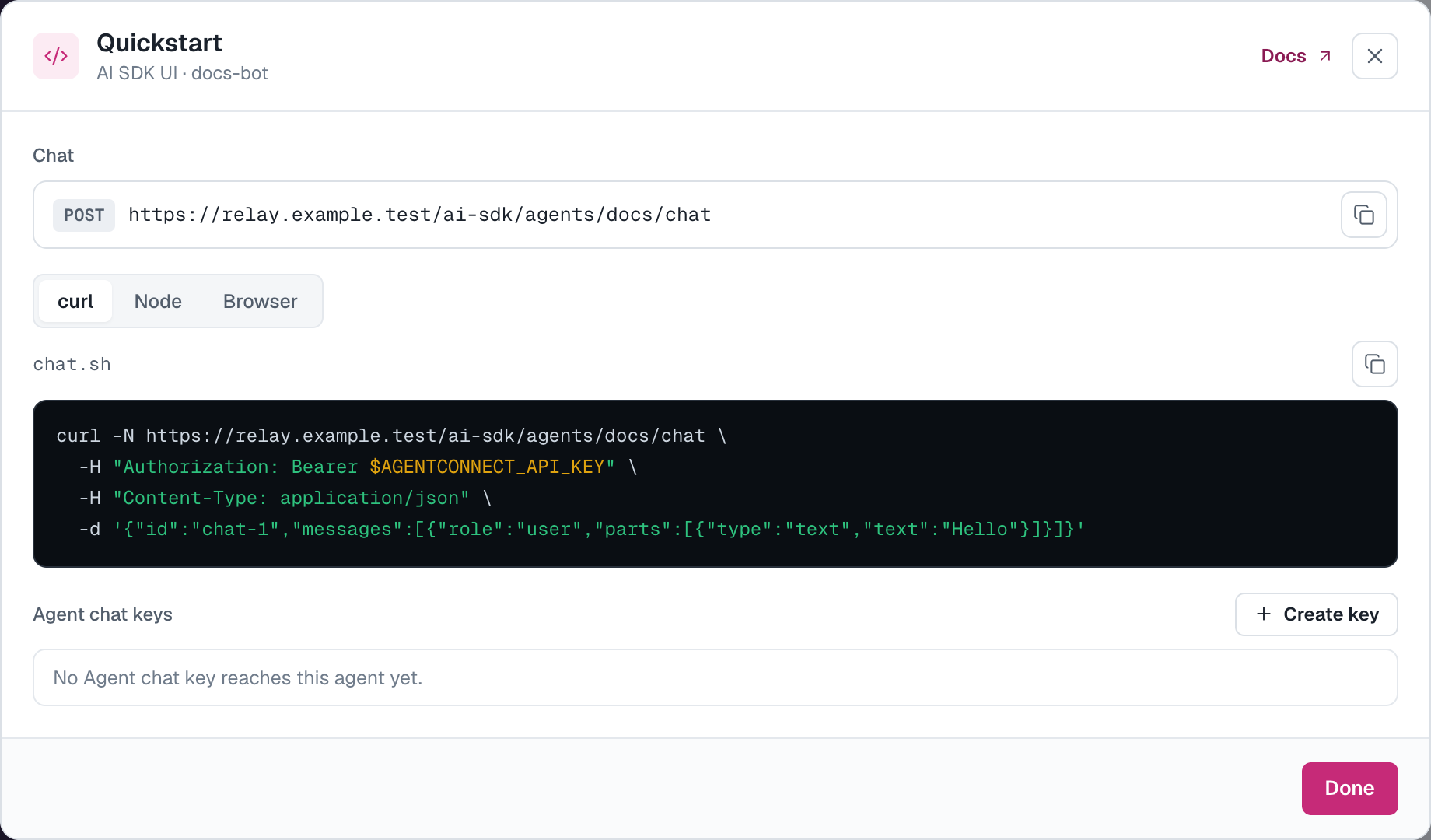
The agent's Integrations tab now shows an API card. Open Quickstart to view the chat endpoint for this agent, examples for curl, Node, and the browser, and the keys that can reach it. Removing the API stops incoming calls within a minute; keys that also include other agents remain valid for those agents.
Create a key
Click Create key in the Quickstart. You can also create a key for a service account under Settings → Service accounts → Keys (so it isn't tied to one person), or create a personal key under Profile → API keys. In all cases, configure:
- Permission: Agent chat.
- Agents: Selected agents, then pick the agent.
An Agent chat key only works on the chat endpoint for selected agents that have the API enabled. The Control Plane REST API rejects it. Like any API key, the secret is shown once and expires after 90 days by default. Revoking it takes effect within a minute.
Send a turn
Copy the chat endpoint from the Quickstart. Send a POST request with Authorization: Bearer <key> and the useChat request body ({ id, messages, trigger, … }):
curl -N "$CHAT_URL" \
  -H "Authorization: Bearer $AGENTCONNECT_API_KEY" \
  -H "Content-Type: application/json" \
  -d '{"id":"chat-1","messages":[{"id":"m1","role":"user","parts":[{"type":"text","text":"How do I install the daemon?"}]}]}'
The chat endpoint is <relay-url>/ai-sdk/agents/<agent-id>/chat. On AgentConnect OSS, <relay-url> is your relay's public URL.
The request body's id (1 to 128 characters) identifies the conversation:
- The first turn with a new
idopens a conversation, and later turns with the sameidcontinue it.useChatgenerates anidper chat and sends it on every turn. - Conversations belong to the key's owner. Sending the same
idwith another member's key starts a separate conversation. - The relay only reads the text parts of the last user message. Because the agent's session already stores the history, earlier messages, file parts, and
data-*parts are ignored. If the last message answers an agent question or approval prompt, it continues that turn instead; see Questions and approvals.
The response is a text/event-stream with the header x-vercel-ai-ui-message-stream: v1. Event parts follow the AI SDK protocol, and the stream ends with [DONE].
- A turn can run for several minutes. A keepalive comment arrives every 15 seconds.
- Request bodies can be up to 4 MiB, and a turn's text up to 128 KiB.
- Only one turn runs at a time per conversation.
Errors are returned as an HTTP status before any stream begins, with a JSON body whose reason field provides a machine-readable code when available:
| Status | Meaning |
|---|---|
400 | Missing id, or no user message with text. |
401 | Key is unknown, revoked, or expired. |
403 | Key doesn't have Agent chat or Full access permissions, or the agent hasn't added the API (api_disabled). |
404 | Key's agent selection doesn't include this agent, or you don't have access to see it. |
409 | A turn is still running in this conversation (busy), the agent moved since the last turn (agent_moved), or the turn an answer belongs to has already ended (turn_ended). Start a new conversation after agent_moved. |
413 | Request body or turn text exceeds size limits. |
422 | The API's Decision gate declined the turn (declined). |
503 | Agent is offline, paused, or draining. |
What the stream carries
| Part | Content |
|---|---|
text-* | The agent's reply. |
reasoning-* | The agent's thinking. |
data-tool | Tool activity (title and status only). |
data-plan | The agent's plan. |
data-notice | Status notices, such as "Starting sandbox…". |
message-metadata | The session title. |
dynamic-tool | An agent question (agentconnect_ask) or tool approval (agentconnect_approval); see Questions and approvals. |
A client that only renders text displays only the reply. Calling stop() in useChat only aborts the HTTP request: the turn still finishes, and its output is recorded in the session transcript in the console. Interrupted streams can't be resumed yet.
Questions and approvals
A turn can pause when the agent needs input that only the caller can provide: either the agent asks a question, or a tool call needs approval. The stream delivers this as a dynamic-tool part and ends with finish reason tool-calls, then waits for your answer.
| Tool | What it asks | How to answer |
|---|---|---|
agentconnect_ask | A question. input.message contains the prompt, and input includes options to choose from, a text or number field, multiple fields, or a url to open. | Call addToolOutput with the chosen value, an array for multi-select, one value per field for fields, or the url once opened. Pass state: 'output-error' to dismiss the question. |
agentconnect_approval | Approval for one tool call. input.tool is the tool name and input.detail gives a one-line summary (such as the command). | Call addToolApprovalResponse({ id, approved }). |
Send the answer as the next request. useChat does this automatically when you set sendAutomaticallyWhen to lastAssistantMessageIsCompleteWithToolCalls or lastAssistantMessageIsCompleteWithApprovalResponses. The relay resumes the same turn and streams the rest of the reply into the same assistant message. Because each tool call's callProviderMetadata identifies the turn it belongs to, send the assistant message back exactly as the stream built it.
Declining an approval takes effect immediately, and the agent's editors aren't notified. Approving a tool call takes effect immediately when the agent's What people can do in chat setting is Talk and approve tool calls or higher, since the conversation belongs to the key's owner. At Talk to the agent, an approval only takes effect immediately with a Full access key owned by someone who can edit the agent; with any other key, the request goes to the agent's editors in the console, and the turn waits for their decision. A public site can reject every approval in code so visitors never trigger editor prompts (this site's Ask AI panel does this).
Pending turns don't wait indefinitely:
- If unanswered for 10 minutes, the turn is cancelled.
- Sending a new user message instead of an answer cancels the waiting turn and starts a new one.
- Answering a turn that has already ended returns
409withturn_ended.
From Node
The AI SDK's DefaultChatTransport sends turns and parses the stream. It requires AI SDK 6 or later (npm i ai):
import { DefaultChatTransport } from 'ai'

const transport = new DefaultChatTransport({
  api: process.env.CHAT_URL,
  headers: { Authorization: `Bearer ${process.env.AGENTCONNECT_API_KEY}` }
})
const stream = await transport.sendMessages({
  trigger: 'submit-message',
  chatId: 'chat-1', // the conversation; send the same id again to continue it
  messageId: undefined,
  abortSignal: undefined,
  messages: [{ id: '1', role: 'user', parts: [{ type: 'text', text: 'How do I install the daemon?' }] }]
})
for await (const chunk of stream) if (chunk.type === 'text-delta') process.stdout.write(chunk.delta)
From a browser
Never expose your API key in browser code. Put a route on your own server in front of the chat endpoint to attach the key and forward useChat's request body unchanged. Here's a Next.js route handler (app/api/chat/route.ts):
export async function POST(req: Request) {
  const upstream = await fetch(process.env.CHAT_URL!, {
    method: 'POST',
    headers: { Authorization: `Bearer ${process.env.AGENTCONNECT_API_KEY}`, 'Content-Type': 'application/json' },
    body: await req.text(),
    signal: req.signal
  })
  return new Response(upstream.body, {
    status: upstream.status,
    headers: { 'Content-Type': 'text/event-stream', 'x-vercel-ai-ui-message-stream': 'v1' }
  })
}
On the page, point useChat at your proxy route (requires ai and @ai-sdk/react, AI SDK 6 or later):
'use client'
import { useChat } from '@ai-sdk/react'
import { DefaultChatTransport } from 'ai'

export default function Chat() {
  const { messages, sendMessage } = useChat({ transport: new DefaultChatTransport({ api: '/api/chat' }) })
  // Render messages, and call sendMessage({ text }) on submit.
}
All visitor conversations belong to the key's owner, and each visitor can only access conversations for their own chat IDs (useChat generates random IDs). Rate-limit visitors on your proxy route, since AgentConnect limits concurrency per conversation, not requests per visitor.
This site's own route in the agentconnect-md/docs repository goes further: it generates the chat ID server-side, stores it in an HttpOnly cookie per open tab, and starts a new conversation when the panel is cleared. See lib/ask-ai.ts.
Gate turns by a Decision
Clicking Add decision on the API card applies the same filtering rules as a channel's By decision trigger: the agent only answers when the Decision matches the incoming message, and the endpoint returns 422 otherwise. If a Decision can't be evaluated, the call proceeds as if no gate were set. Recent evaluations in the rule settings shows each call the gate evaluated and why; only members who can edit the agent can see it.
Sessions and safety
A conversation opened through the API appears as a standard webchat session owned by the key's owner, with the key listed as its source. Service account sessions are visible to the whole organization, while personal key sessions are private to that user. Usage is metered on the agent like any other turn; see Billing & usage.
The agent receives untrusted input on every turn. Configure it accordingly:
- Don't give it secrets or write access to repositories.
- Run it in a sandbox that isolates untrusted input (
microsandboxor Kubernetes). - Set What people can do in chat to Talk to the agent so visitor approvals don't take effect on their own.
- Keep it in an organization whose members are permitted to read those transcripts.
Troubleshooting
403"this agent does not accept API calls": Enable the API on the agent (see Add the API to the agent).403"this API key cannot chat with agents": The key's permission is Read-only. Create an Agent chat key instead.404"agent not found": The key's agent selection doesn't include this agent.409on a turn: A turn is still running in this conversation. Wait for it to finish, or start a conversation with a new chatid.409turn_endedon an answer: The turn waited 10 minutes without a response, or a new message replaced it. Send your request again in a new message.503right after a deployment: The agent's daemon is reconnecting. Retry after a moment.
How is this guide?