Variables & secrets
Set runtime environment values once for an organization or directly on one agent.
Variables and secrets are injected as environment variables in an agent's runtime. Define shared values once at the organization level, or set them locally on a single agent.
| Scope | Manage from | Applies to |
|---|---|---|
| Organization | Settings → Variables & secrets | All or selected agents |
| Agent | Agent → Configuration | One agent |
Use variables for non-sensitive configuration such as endpoints and feature flags. Use secrets for credentials and other values that shouldn't be readable after saving.
Share a value across agents
Only organization Owners can manage the organization registry:
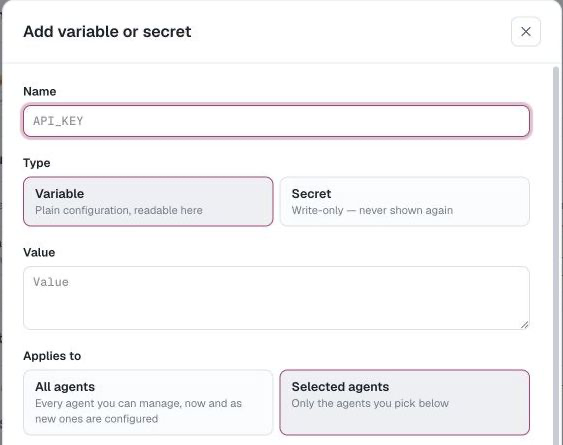
- Open Settings and find Variables & secrets.
- Click Add, then pick Variable or Secret.
- Enter a standard environment-variable name (such as
SERVICE_URLorSERVICE_API_KEY) and its value. - Choose All agents or Selected agents.
- Save the entry.
Names can include letters, digits, and underscores, and can't start with a digit.
All agents assigns the entry to every agent you can manage and applies it automatically to agents you add later. Selected agents applies it only to the agents you pick. The picker lists only agents you can manage, and editing that selection won't remove existing assignments on other private agents.
Assigned entries appear on the agent's Variables or Secrets card with an Organization label and are read-only there. Owners update or rotate them under Settings, while other agent editors can still manage that agent's local entries.
Set a value on one agent
Open the agent's Configuration tab and edit its Variables or Secrets card. These entries apply only to that agent.
When creating a new agent, the final Variables and Secrets step adds the same agent-local values. Organization entries set to All agents are applied automatically on creation.
Precedence
When an agent has a local entry with the same name as an assigned organization entry, the organization entry usually takes precedence:
| Organization entry | Agent entry | Effective value |
|---|---|---|
| Variable | Variable | Organization variable |
| Secret | Variable or secret | Organization secret |
| Variable | Secret | Rejected |
The last case is rejected so a readable variable can't replace a write-only secret. An overridden agent-local entry stays saved as a fallback and takes effect again if the organization assignment is removed or deleted.
Organization entry names are unique across both variables and secrets. Names and types can't be changed after creation; to rename an entry or switch its type, delete and recreate it.
Secret handling
Secret values are write-only. Once saved, AgentConnect displays only the name and a mask; editing shows Replace value instead of exposing the stored value. Variable values remain readable to anyone who can view an assigned agent, so don't put credentials in variables.
Write-only governs what users can read back through AgentConnect, not how values are stored at every layer. On AgentConnect OSS, configure secret storage encryption to encrypt values at rest in the Control Plane database. The daemon running the agent stores its own copy of the resolved value in the agent's local config file, readable by the OS user running the daemon. Treat every connected machine as trusted with the secrets of the agents placed on it.
Secrets are exposed to the agent runtime and its tools. AgentConnect tries to mask known literal secret values in agent output, though output masking isn't a security boundary. Give each agent only the secrets it needs, paired with appropriate permissions and sandboxing.
Variables and secrets are passed strictly as environment variables. They don't expand placeholders inside agent descriptions, schedules, integration settings, or other config fields.
Kubernetes and Docker credentials
Two names are written to disk as files instead, because the tools that consume them expect file paths:
| You set | The agent's tools get |
|---|---|
KUBECONFIG_DATA | KUBECONFIG, pointing at the written kubeconfig file |
DOCKER_CONFIG_DATA (or the older DOCKER_AUTH_CONFIG) | DOCKER_CONFIG, pointing at the written config directory |
Put the full file contents in the …_DATA secret. While the agent is running, AgentConnect writes it as an owner-only file and points kubectl or docker at it. Set either the …_DATA secret or the matching path variable yourself, not both.
Updates and removal
Rotating, retargeting, or deleting an organization entry updates affected agents and restarts them so upcoming work picks up the new environment. Rotate during a quiet window if you want to avoid interrupting an active turn.
Removing an organization assignment restores any same-name agent-local fallback. If no fallback exists, the variable is removed from future runtime processes.
How is this guide?