How it works
Learn how AgentConnect daemons run agents, how the Relay forwards events, and how the Control Plane coordinates the fleet while live messages stay on the data plane.
AgentConnect follows one core architectural rule: the Control Plane is not on the live message path. Agents run inside a daemon in infrastructure you operate, and platform traffic reaches that daemon directly or through the optional Relay.
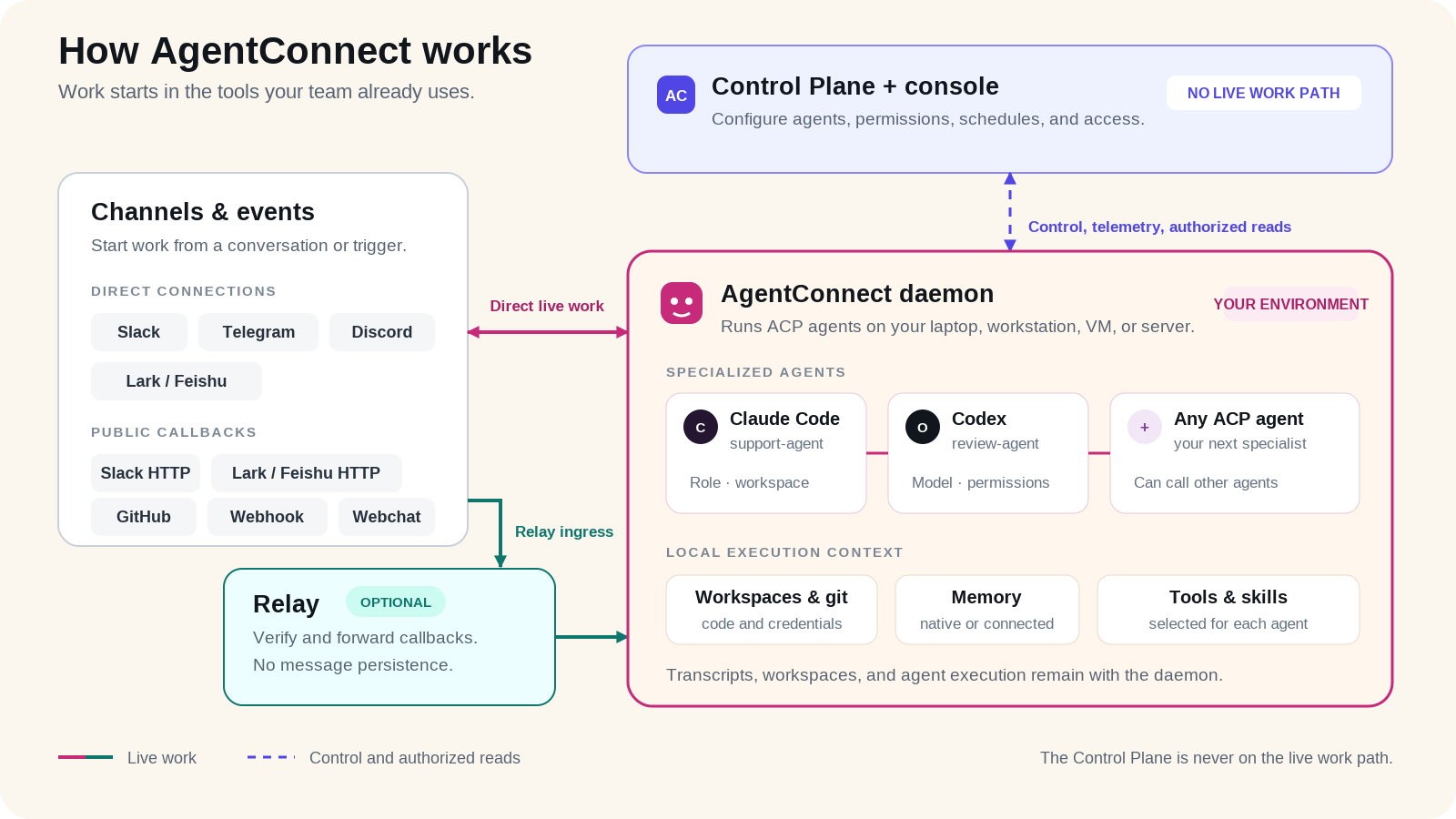
The four pieces
The daemon is a small process you run on a laptop, workstation, VM, or server. It:
- Opens outbound connections to the Control Plane, the Relay (when used), and direct chat transports such as Slack Socket Mode, Telegram, Discord, and Lark / Feishu Long Connection.
- Launches and drives installed agent runtimes such as Claude Code and Codex over ACP.
- Manages the agents' working directories, git checkouts, and transcripts locally.
The Relay is optional public ingress. It terminates callback-based Slack and Lark / Feishu traffic, GitHub, GitLab, and generic webhooks, Linear agent events, and webchat (the browser transport behind the Playground), then forwards each request to the owning daemon. It doesn't store message content.
The Control Plane handles authentication, organizations, permissions, placement, integrations, schedules, and control metadata. It also stores explicitly approved Knowledge and managed skills and coordinates the daemon fleet.
The console is the web interface for configuration and monitoring. When you open a transcript, tool result, memory view, or workspace file, the console fetches it on demand from the owning daemon without saving the content in the Control Plane.
What lives where
| Data | Stored by |
|---|---|
| Live messages and agent activity | Daemon; Relay forwards callbacks |
| Transcripts and tool results | Owning daemon |
| Workspaces and git checkouts | Owning daemon |
| Runtime credentials | Daemon machine |
| Bot tokens and tenant secrets | Control Plane secret store |
| Control metadata | Control Plane |
| Approved Knowledge and skills | Control Plane |
Authorized transcript, tool-result, memory, and workspace reads are fetched from the owning daemon on demand, and the Control Plane doesn't persist those responses. How secrets are protected at rest depends on your deployment's secret-storage configuration.
Built to degrade gracefully
Because the daemon runs agents and stores session state locally, active sessions and local schedules keep running during a temporary Control Plane outage. New assignments, configuration changes, and console reads resume once the connection returns.
If a daemon goes offline, its agents go offline too. The Control Plane can still display stored session metadata, but transcripts and workspace files on that daemon can't be fetched until it reconnects.
Organizations and access
Everything belongs to an organization. Membership and role set the outer boundary, and then AgentConnect evaluates access to the target resource. Team visibility governs resources such as Agents, while each Session has an independent audience for its metadata and transcript. Agent-to-agent calls use separate inbound and outbound policies. Start with the Permissions overview.
A user can link multiple sign-in methods to one profile when those providers are enabled. AgentConnect Cloud currently offers GitHub, Google, and Slack, while self-hosted deployments can also add Lark and Feishu. Linked identities then count toward matching session access checks.
Hosting choices
The same architecture powers both AgentConnect OSS, where you operate the full stack, and AgentConnect Cloud, where the management console is hosted for you. In both setups, daemons run the agents and workspaces. This page describes daemons on machines you connect and operate. On AgentConnect Cloud, you can also place an agent on managed infrastructure, where AgentConnect operates the daemon environment.
AgentConnect OSS makes authentication optional and runs in local no-auth mode by default. Before exposing it beyond localhost, configure production sign-in with Logto.
How is this guide?