Mem0 external memory
Connect an agent to self-hosted Mem0, choose recall and capture policies, and verify memory across sessions.
External memory lets an agent save and recall durable records in a memory service that you operate. This guide uses Mem0 OSS with AgentConnect's first-party Mem0 wrapper.
Before you start
Your deployment operator must complete the optional Mem0 configuration first. After that, you need:
- An organization Owner account
- An online daemon that can reach Mem0
- The Mem0 API key created during deployment
1. Create the organization connection
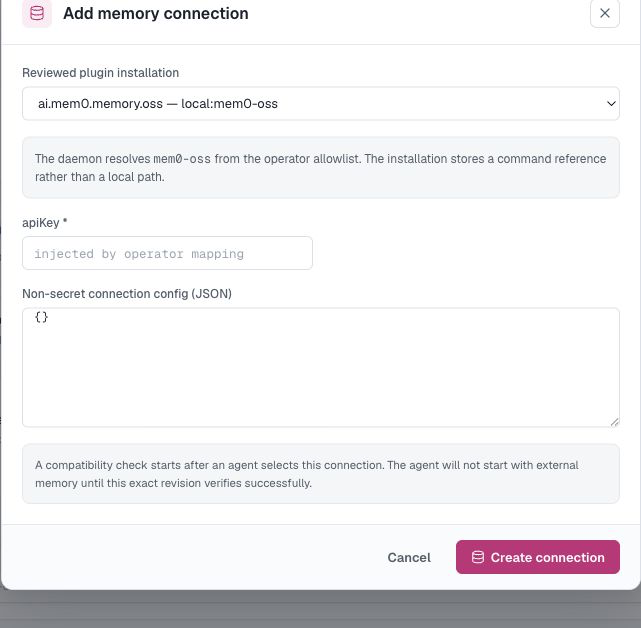
Open Knowledge → External memory → Add connection.
Select the reviewed ai.mem0.memory.oss — local:mem0-oss installation, enter the credential and any non-secret JSON configuration, then select Create connection. If that installation doesn't appear, ask your deployment operator to finish the Mem0 setup first.
Once saved, the credential is write-only.
2. Bind an agent
Open the agent's Memory tab, choose External, and select the connection.
Configure recall and capture independently:
- Recall → Every turn: searches Mem0 before each turn.
- Recall → Tool only: lets the agent search only when it decides it needs to.
- Capture → Manual only: saves only content explicitly marked for memory.
- Capture → Every turn: sends each delivered exchange to Mem0 after you confirm the data boundary.
Start with Every turn recall and Manual only capture unless the workflow specifically needs automatic capture.
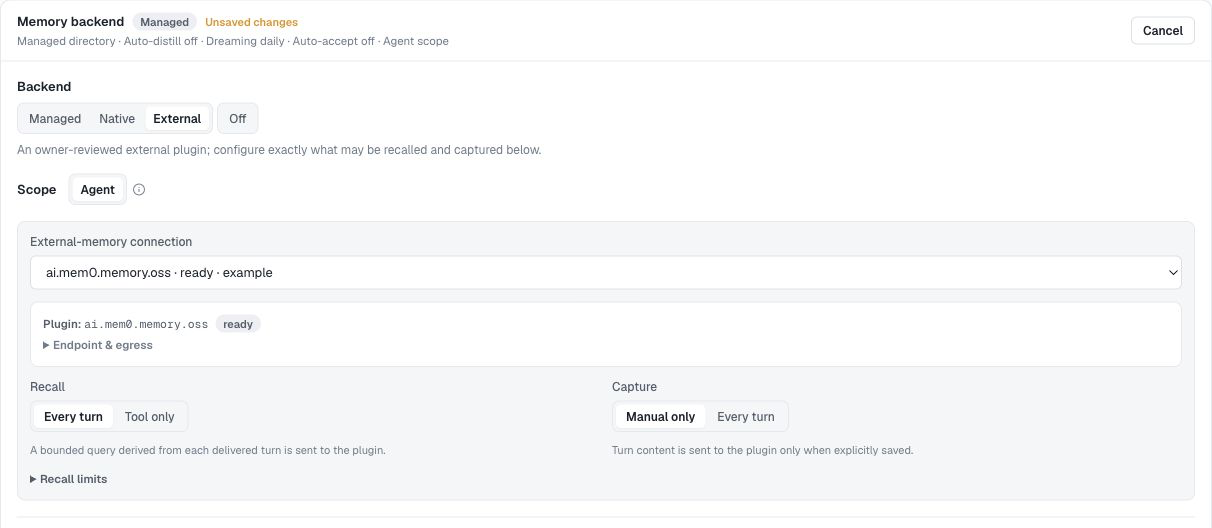
Save your changes and wait for the connection status to turn Ready before running the agent with external memory.
3. Test recall across sessions
For a quick end-to-end check, temporarily switch to Capture → Every turn:
- Start a Playground conversation and send:
Remember that production deploys require a change ticket and two reviewers. - Open the agent's Memory tab and confirm the new record appears.
- Start a new Playground conversation with the same agent and ask:
What do I need before a production deploy?
With Recall → Every turn, the new session pulls in the saved record. Memory is scoped per agent, so other agents don't receive it automatically.
Connection status
| Status | What it means |
|---|---|
| Connecting | Waiting for a compatible online daemon |
| Invalid | Review the connection error and deployment setup |
| Degraded | A previously working connection is temporarily unavailable |
| Ready | The agent can recall and capture memory |
Editing a connection triggers a fresh check. Unbind every agent before deleting the connection. Deleting it in AgentConnect doesn't delete any records stored in Mem0.
How is this guide?