Sandboxing
Choose how AgentConnect isolates agent sessions. Compare host execution, Linux sandboxes, virtual machines, and Kubernetes pods, and configure workspace mounts.
If you deploy on Kubernetes, the official Helm chart uses Agent Sandbox by default to manage agent pods and persistent workspaces. See Kubernetes deployment for setup and configuration.
For self-hosted daemons, each agent's Execution strategy sets the isolation level for its sessions, ranging from direct host execution to a separate VM. Both srt and microsandbox require Linux. On macOS or Windows daemons, only host is available and the picker marks the other two as unavailable. Each sandbox gets a private runtime home directory and its assigned workspace. To expose additional host directories, configure mounts.
Choose an execution environment
| Option | Best for | Environment |
|---|---|---|
Host (host) | Trusted tasks that need full host access | Runs directly on the host with the daemon user's permissions |
Sandbox (srt) | Trusted internal development and automation | Host tools with filesystem and network restrictions |
VM (microsandbox) | General-purpose tasks and less-trusted code | A separate VM per session |
| Kubernetes (Agent Sandbox) | Teams running many agents across machines | Centrally managed agent pods and persistent workspaces |
srt isn't a full security boundary. It shares the host's kernel and user, and the daemon runs some workspace operations outside it (such as Git commands in a workspace shared across sessions). If an agent processes external input, such as pull requests and issues from outside contributors or public webhooks, run it in microsandbox or Kubernetes, even when a maintainer starts the session.
Compare Linux daemon sandboxes
| What you use | SRT | microsandbox |
|---|---|---|
| Tools and packages | Host tools; install in writable paths | Image tools; install inside the session VM |
| Host files | Protected paths hidden; other paths may be readable | Only assigned host mounts |
| Shared caches | Shared read-only or writable mounts | Shared mounts or private overlays |
| Internet | Through a proxy (tools must support it) | Public internet (private networks restricted) |
| Local servers | Not published to the host | Not published to the host |
| CPU and memory | No per-session limits configured | Configurable per VM |
| OAuth credentials | Tool rules (Claude/Codex); otherwise unshielded | Same as SRT |
| Saved API keys | Host proxy (supported saved keys) | Same as SRT |
| Code-host tokens | Host proxy; never in the sandbox | Same as SRT |
Both sandboxes write to the assigned workspace. Shared workspaces and writable host mounts remain shared across sessions, while microsandbox keeps all other VM files separate per session.
Tool rules restrict the runtime's built-in tools from accessing credential files, and the host proxy keeps code-host tokens and supported API keys out of the session. See Credential protection for supported runtimes, login methods, and limitations.
For technical details on the underlying sandboxes, see SRT isolation and microsandbox.
Pick an execution strategy
Select a strategy under Execution strategy when creating or editing an agent. The picker shows what's available where the agent runs:
- One daemon: That daemon's available strategies.
- A daemon group: Strategies supported by at least one serving member. Sessions won't run on a member that doesn't support the chosen strategy, so verify that every member you rely on supports it.
- AgentConnect Cloud or a Kubernetes daemon pool: No picker is shown because every session already runs in its own pod.
| Option | Boundary |
|---|---|
Host (host) | None |
Sandbox (srt) | An SRT process sandbox |
VM (microsandbox) | A separate virtual machine |
Strategies that can't run on the selected daemon remain in the list, disabled and labeled unavailable. Hover over one to see why: either the failure reason from the daemon's startup check, or sandbox.<strategy> is off on this daemon if it was turned off in configuration.
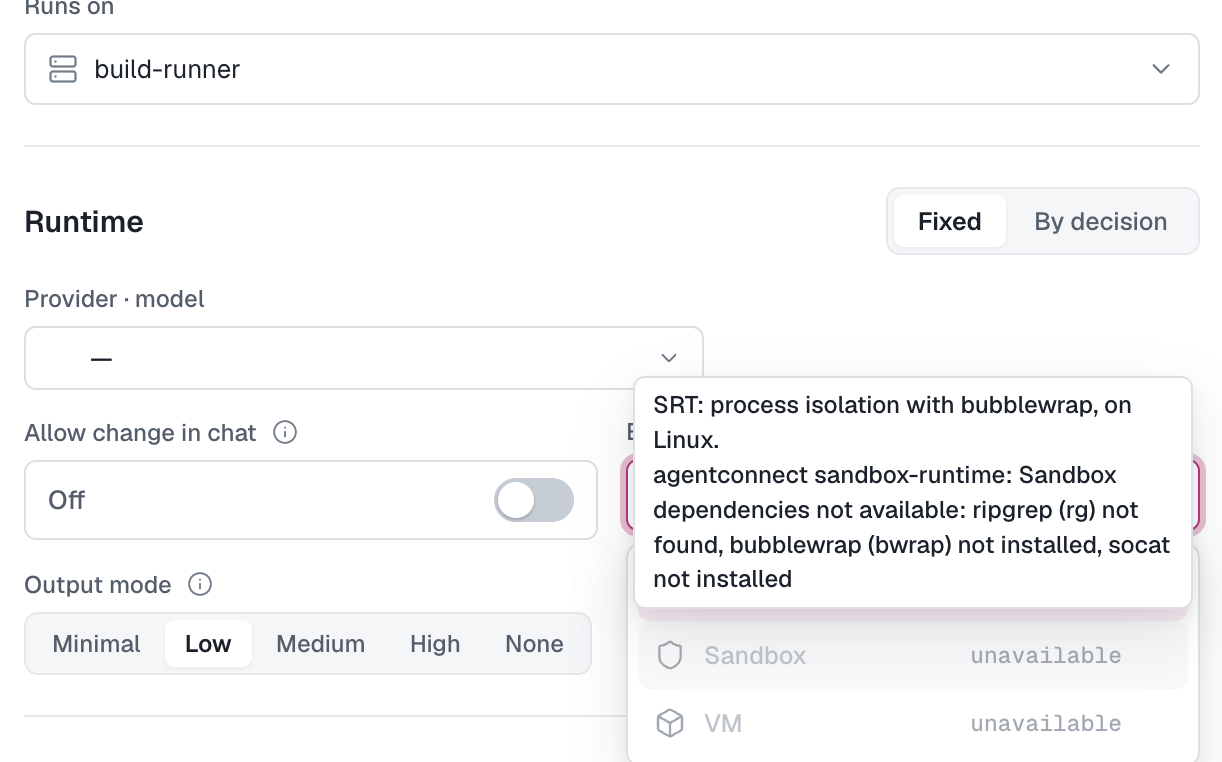
New agents default to host when it's enabled, or the first available sandbox otherwise. Daemons too old to report strategies only offer host; upgrade the daemon to enable sandboxes.
In Edit, the picker is locked while a move to another daemon is pending. Save the move first. If an agent's placement no longer supports its saved strategy, that strategy stays selected with a "Not offered where this agent is placed." warning. You can view the current setting in the Execution strategy row of the Runtime card on the agent's Configuration tab.
AgentConnect never falls back to a weaker isolation level. If a session's configured strategy can't run on its machine, the daemon refuses to start the session and reports the reason.
Agents created before this picker existed kept their previous behavior: agents with Run in sandbox turned off use host, and agents with it turned on use whichever sandbox their daemon was configured with (srt or microsandbox).
Configure the daemon
Add sandbox settings to the daemon's existing config.json (typically ~/.agentconnect/config.json) while keeping your existing connection and identity fields.
The sandbox object specifies which strategies the daemon offers. All three are enabled by default, so omitting them is equivalent to:
{
  "sandbox": {
    "host": true,
    "srt": true,
    "microsandbox": true
  }
}
Set each strategy to true (enabled with defaults), false (disabled), or, for microsandbox, an object with VM settings. At startup, the daemon checks each enabled strategy without installing or downloading anything. If a strategy fails its check, the daemon logs the reason and marks it unavailable in the picker. If no strategy is available, the daemon refuses to start.
SRT
On Ubuntu or Debian, install the required packages:
sudo apt-get update
sudo apt-get install --yes bubblewrap ripgrep socat
The host must also allow unprivileged user namespaces, which the daemon checks at startup. Ubuntu 24.04 and later restrict them by default (and Ubuntu 23.10 does if the restriction is enabled). Follow the steps to allow user namespaces for bubblewrap first.
microsandbox
To adjust VM resources, pass an object to microsandbox:
{
  "sandbox": {
    "microsandbox": {
      "cpus": 2,
      "memoryMiB": 2048,
      "diskGiB": 10
    }
  }
}
The snippet above shows the default values. CPU and memory limits apply per VM. diskGiB sets the maximum capacity for each writable disk (the root disk, Docker data disk, and an extra disk when using overlays); disk files grow on demand as data is written.
microsandbox requires a Linux amd64 host, and the daemon user needs access to /dev/kvm and /dev/vhost-vsock. If the daemon runs on a virtual machine, nested virtualization must be enabled. On the first microsandbox session, the daemon installs the microsandbox SDK and prepares the runtime image, so that first startup takes longer when the image isn't cached.
Require a sandbox
To prevent unsandboxed sessions on a daemon, disable host:
{
  "sandbox": {
    "host": false
  }
}
With host disabled, the picker marks host as unavailable on this daemon and new agents default to the first available sandbox. Existing agents set to host won't run there until you switch them to a sandbox strategy. If no sandbox is available either, the daemon refuses to start.
Older configurations
sandbox.backend and security.requireSandbox have been removed. If either field is still in config.json, the daemon refuses to start and prints the replacement:
| Old setting | Replace with |
|---|---|
sandbox.backend (any value) | Remove it. All strategies are offered by default, and the agent's Execution strategy picks the sandbox. |
security.requireSandbox: true | "sandbox": { "host": false } |
security.requireSandbox: false | Remove it. host is on by default. |
The --require-sandbox CLI flag has also been removed. Set "host": false in config.json instead.
Restart the daemon after editing config.json:
npx -y @agentconnect.md/cli restartFor a named instance, append --instance <name>. For a foreground daemon, relaunch its original command. See Upgrade the daemon for instance commands.
Runtime image
By default, microsandbox uses the ghcr.io/agentconnect-md/runtime-sandbox-full image matching the installed daemon release. To use a compatible custom image instead:
{
  "sandbox": {
    "microsandbox": {
      "image": "registry.example.com/agentconnect/runtime-sandbox-full:build-tag"
    }
  }
}
Remove the image property to switch back to the default. Development builds require an explicit image setting.
If you change the image contents, VM resources, mounts, or credential layout, affected VMs are rebuilt on refresh or next use. Host-mounted workspace, home, and memory files are preserved, while VM-local files, Docker data, and overlay writes are reset. Keep any durable data in host mounts. Updating to a new image tag with identical contents reuses existing VMs.
The full image includes Claude Code, Codex, DeepSeek Harness, OpenCode, pi, Oh My Pi, Grok Build, Qwen Code, Cline, Devin, Antigravity ACP, GitHub Copilot, Qoder CLI, and Qoder CN CLI. Antigravity requires CPU AVX support, and Amp requires a custom image.
The image also includes Docker Engine, Buildx, and Compose. Agents can start Docker inside their VM when their runtime permissions allow it. Docker data persists across VM stop/start cycles, but resets when the VM is rebuilt. Note that Codex's tool restrictions currently block the image's sudo-based Docker startup.
Network access
microsandbox sessions can reach public APIs and package registries. Each VM has its own network namespace, so multiple sessions can bind the same local port without conflict. VM ports aren't published to the host.
The network policy restricts access to private networks, though it doesn't guarantee blocking every public IP or DNS name that routes back to the host. SRT routes outbound web traffic through a proxy, so tools that ignore proxy environment variables may fail to connect.
Troubleshooting
| Message | What to check |
|---|---|
| Strategy unavailable | The reason in the picker's tooltip, the strategy's requirements, and daemon logs |
| Session refused by strategy | The agent's strategy can't run on that machine; fix the reason or pick another one |
| Binary not installed in image | The selected image contains the runtime |
| Login required | The runtime is signed in as the daemon user |
| Mount rejected | Existing source, valid target, and supported mode (see Mounts) |
| VM replacement failed | Check image availability and mount access, then retry |
The standalone chat command supports SRT. For microsandbox, use daemon-hosted sessions.
Ubuntu 23.10 and later: allow user namespaces for bubblewrap
Symptom: The Sandbox strategy (srt) is marked unavailable in the Execution strategy picker, and its tooltip shows one of these errors:
bwrap: loopback: Failed RTM_NEWADDR: Operation not permitted
bwrap: setting up uid map: Permission denied
Newer daemons report the AppArmor restriction directly in the error message.
Cause: Ubuntu 24.04 and later set kernel.apparmor_restrict_unprivileged_userns=1 by default in /usr/lib/sysctl.d/10-apparmor.conf. Ubuntu 23.10 added the setting, though it defaults to 0 there. When enabled, unprivileged user namespaces get no capabilities, which prevents bubblewrap from setting up the sandbox's isolated network. Setting 0 at runtime with sysctl -w doesn't survive a reboot.
Fix: Add an AppArmor profile that permits user namespaces for /usr/bin/bwrap (where the bubblewrap package installs it), leaving all other programs restricted. Create /etc/apparmor.d/bwrap and load it:
sudo tee /etc/apparmor.d/bwrap > /dev/null <<'EOF'
abi <abi/4.0>,
include <tunables/global>

profile bwrap /usr/bin/bwrap flags=(unconfined) {
  userns,
  include if exists <local/bwrap>
}
EOF
sudo apparmor_parser -r /etc/apparmor.d/bwrap
AppArmor reloads this profile automatically on every boot.
Don't use Ubuntu's bwrap-userns-restrict profile from the apparmor-profiles package. It strips capabilities inside the sandbox, so the daemon's startup check passes, but runtimes that start their own nested bubblewrap sandbox (such as Codex) fail with bwrap: No permissions to create new namespace.
Alternatively, disable the restriction system-wide. Note that this turns the protection off for every program on the machine, not just bubblewrap:
echo 'kernel.apparmor_restrict_unprivileged_userns = 0' | sudo tee /etc/sysctl.d/60-userns.conf && sudo sysctl --systemVerify: Run this command as the daemon user:
bwrap --unshare-net --ro-bind / / true && echo okIt prints ok once bubblewrap can start with an isolated network.
Restart the daemon so it re-checks available strategies: click Restart in the daemon's actions menu in the console, run npx -y @agentconnect.md/cli restart on the host, or restart it through your service manager.
How is this guide?