Shared Slack bot routing
Use one shared Slack identity while each channel routes to an agent with its own model, instructions, workspace, and trigger.
A shared Slack bot lets one Slack App serve multiple AgentConnect agents. People invite and mention a single bot identity, while AgentConnect routes each channel to the agent configured as its default dispatch.
This is useful when different channels need different models, repositories, tools, or behavior without installing a separate Slack App for every agent.
This follows the contextual routing pattern from Multi-agent work modes, where each inbound message goes to one selected agent instead of broadcasting to all of them.
| Slack conversation | Default dispatch | Trigger | Example role |
|---|---|---|---|
#engineering | engineering-agent | any message | Implementation and repository work |
#security | security-agent | @-mention | Threat analysis and sensitive reviews |
#support | support-agent | any message | Product questions and issue triage |
Before you start
You need:
- Two or more online agents
- Permission to create or install a Slack App in the workspace
On AgentConnect Cloud, Relay-backed Slack delivery is ready out of the box. Shared bots require HTTP (Events API), because Socket Mode bots are bound to a single daemon and can't be shared across agents.
AgentConnect OSS operators should configure public Relay URLs before creating the App.
1. Create the channel-specific agents
Create one agent for each behavior you want, and configure its model, instructions, workspace, tools, and permissions on the agent page.
Keep the specialization in the agents themselves instead of writing one large prompt that branches on channel names. Let the shared bot's channel routing send each channel straight to the right agent.
For example:
engineering-agentuses a coding model with write access to the main repositorysecurity-agentuses a stronger reasoning model with read-only access and a security-focused promptsupport-agentuses a fast model with product documentation tools
2. Make the Slack bot sharable
AgentConnect Cloud
Start with the built-in app:
- On the built-in
agentconnectagent, choose Integrations → Add integration → Slack → Add to Slack and approve the workspace installation. Skip this step if it's already connected. - Open Integrations → Messaging apps → Slack.
- Turn on Sharable for the built-in AgentConnect bot.
The Cloud app already uses HTTP delivery, so there's no callback URL, signing secret, or transport to configure.
Custom app or self-hosted deployment
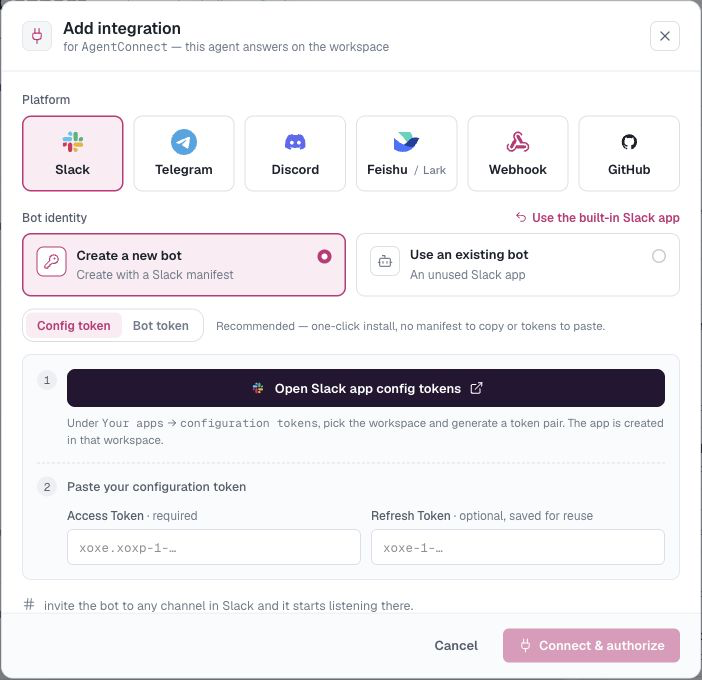
On the first agent, open Integrations → Add integration → Slack:
- Create a Slack App using a configuration token or the manifest flow.
- Set Delivery to HTTP (Events API).
- Enable Shared bot — let multiple agents use this one bot.
- Complete the Slack installation and connect it to the agent.
With the configuration-token flow, AgentConnect captures the signing secret automatically. With the manifest flow, paste the bot token and signing secret from your Slack App settings.
Invite the App to every channel it should serve:
/invite @your-botThe channels appear in AgentConnect once Slack reports the bot's membership.
3. Connect the same App to the other agents
For each remaining agent:
- Open Integrations → Add integration → Slack.
- Choose Use an existing bot.
- Select the shared bot you created.
- Connect it to the agent.
Don't create another Slack App. Every connected agent now shares the same Slack bot identity and credentials while running on its own daemon.
4. Assign each channel
Open Integrations → Messaging apps → Slack and expand the shared bot. For each channel, pick its Default dispatch agent. To pick the agent per conversation instead, select Or pick by decision and route with a Decision.
Next, set the channel trigger from any connected agent's Slack integration. Because the trigger belongs to the shared bot and channel, AgentConnect syncs the same setting across every member-agent row:
- @-mention: run only when the bot is mentioned. Unmentioned follow-ups continue in threads the agent has already joined.
- any message: run the default agent for every message in that channel.
- Off: mute all inbound routing for this shared bot in the channel, including mentions, existing threads, and fallback to a sibling or default agent. Restricted agents also start Off until an editor enables the conversation.
Every active shared-bot channel has exactly one default dispatch agent. Changing the assigned agent in the Console keeps the channel's trigger setting intact.
How routing behaves
- The channel's default dispatch and trigger determine which agent handles a new message.
- Once a thread is assigned, unmentioned follow-ups stay with that agent.
- Replies use the same Slack App identity. When the response footer is enabled, it shows the actual AgentConnect agent, runtime, and model.
- An agent can't trigger itself: AgentConnect drops each agent's own messages before they loop back in.
An unaddressed new message in a channel routes to one agent: the channel's default dispatch. A shared bot routes multiple channel-specific agents behind one identity rather than broadcasting every message to all of them.
If someone explicitly brings another shared-bot agent into the same thread, both agents keep their own sessions and settings. Use agent visibility if those agents should also delegate directly to one another.
Troubleshooting
| Symptom | Check |
|---|---|
| Sharable is unavailable | Use HTTP delivery with a live Relay; Cloud is preconfigured |
| A channel is missing | Invite or re-invite the bot; wait for membership sync |
| The wrong agent answers | Check Default dispatch and the channel trigger |
| Follow-ups use the previous agent | Start a new thread or switch the session agent |
See Slack for installation details and Configure an agent for models, prompts, workspaces, and permissions.
How is this guide?