Manage daemons
Monitor daemon health, manage services, move agents safely between machines, and run agents on AgentConnect Cloud.
The Infra page lists every machine connected to your organization under Daemons. Open a daemon to inspect its health, available runtimes, resources, hosted agents, capabilities, and visibility.
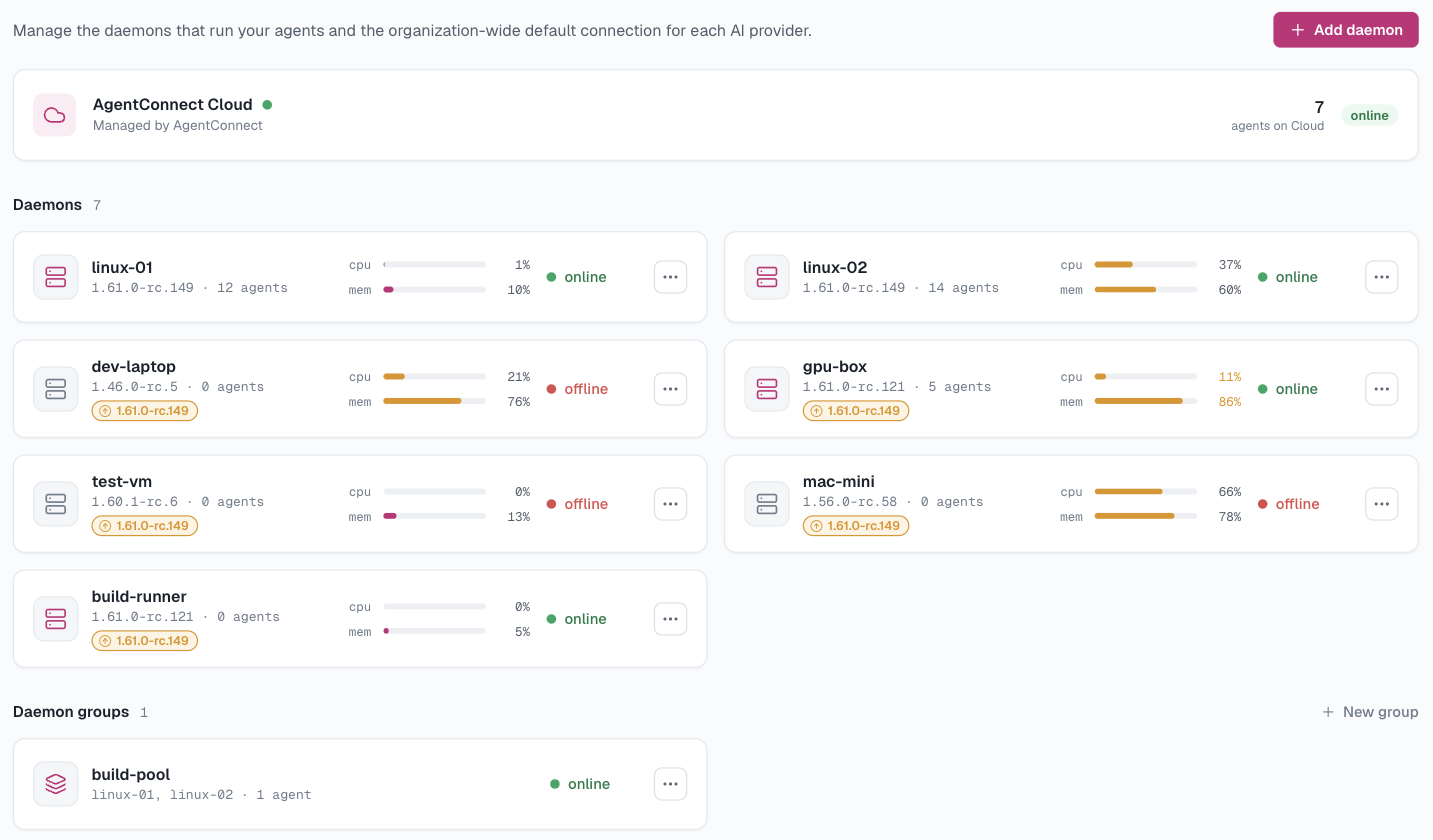
Status
| Status | Meaning |
|---|---|
| Online | Connected; agents are reachable |
| Offline | Disconnected; agents are unavailable |
Transcripts stored on an offline daemon can't be fetched until it reconnects.
During a restart or upgrade, the status shows Restarting or Upgrading until the daemon is ready again.
Actions
Restart and upgrade require standard daemon edit permission: any Owner or Collaborator who can see the daemon can run them. Viewers can't.
- Restart (online daemons): Drains active work and asks the service supervisor to relaunch the same version.
- Upgrade (online daemons): Installs the selected release, drains and relaunches the daemon, and health-checks the result. If the upgrade fails, it rolls back when possible. Start an upgrade from the Update to <version> badge on an outdated daemon. See Upgrade the daemon for channels, host-side upgrades, and rollback.
- Reconnect (offline daemons): Generates a fresh one-time token and shows a command to run on that host. The daemon keeps its identity and agent placements.
- Delete (offline daemons): Removes the daemon and revokes its keys. Its agents become unplaced and inactive, so they stop responding until you place them on another daemon. The local process and files remain on the machine until you stop or remove them there.
Placement
An agent placed on a connected daemon runs on that single machine, which stores its workspace, runtime processes, and transcripts. You can move an agent from its Configuration tab when both daemons are online, ready, and compatible with its runtime, model, and MCP servers. To keep an agent running if one machine goes down, place it on a daemon group instead.
Moving an agent cold-reprovisions it from its saved definition and doesn't migrate daemon-local workspace files, memory, or transcripts. Commit or back up local work first, and expect GitHub workspaces to be cloned again on the target machine.
AgentConnect Cloud
On AgentConnect Cloud, the daemon picker includes one option outside your own machines: AgentConnect Cloud. Place an agent there and it runs on infrastructure managed by AgentConnect. You don't need to prepare a machine, install or sign in to a runtime, or supply provider API keys. Model access is included with a curated set of runtimes and models, and each agent runs in its own isolated environment.
On the Infra page, this appears as a single AgentConnect Cloud entry. Open it to see the agents placed there and recent credit activity. Unlike a machine you connect yourself, a Cloud placement isn't tied to one host: the agent's workspace, memory, and transcripts live in its managed environment, which AgentConnect may serve from different capacity over time. Cloud placements and your own machines work side by side in the same organization. Moving an agent between them is a cold reprovision like any other move: the agent is recreated from its saved definition, and existing workspace, memory, and transcript data stays behind.
Pricing
Cloud is usage-based. Placing an agent on Cloud costs nothing by itself; you only pay for the model usage from its sessions:
- Published provider API rates: Model usage is billed at the model provider's published API rates, with no markup. This includes Decision evaluations. When a provider changes its published prices, Cloud rates change to match.
- Prepaid credit balance: Usage is deducted from your organization's prepaid credit balance. Owners can add credits on the Billing page. See Billing & usage for the balance, the ledger, and the Analytics view behind it.
- No overage billing: When your balance runs out, Cloud placements stop taking new model traffic until you add credits.
Agents on daemons you connect yourself are never billed by AgentConnect. They use the provider credentials configured on those machines, and model traffic goes directly between your machine and your provider.
Session retention
Each daemon has an Expire sessions setting: pick a common window, enter a custom number of days, or keep sessions indefinitely. It controls how long that daemon keeps finished transcripts and session worktrees. The Control Plane still keeps session metadata after local content expires. See Session retention and cleanup for what remains visible.
Troubleshooting
- Stuck on “Waiting for daemon…” in Add daemon: The command likely failed in your terminal. Check that Node is 24.12 or newer (
node -v) and that the machine can reach your Control Plane URL over HTTPS/WSS. - Daemon shows offline while the process is running: Check the log (
npx -y @agentconnect.md/cli statusprints its path; the default is~/.agentconnect/logs/daemon.log). Repeatedconnect/handshake failederrors usually mean the key was revoked. Use Reconnect for that daemon, or add a new one if it was deleted. - Runtime missing from the pickers: Check the daemon user's runtime installation and saved login. For microsandbox, the runtime must also be installed in the selected image. Use the Host, Sandbox, and VM tabs in Runtimes to check each strategy; a strategy that can't run shows the reason where its runtimes would normally appear.
- An execution strategy is unavailable: Hover over it in the agent's Execution strategy picker to see why, and check the daemon log. SRT needs its host tools and user namespaces; microsandbox needs KVM and vsock access. Any strategy set to
falsein the daemon'ssandboxconfiguration shows as off on that daemon. See Sandboxing.

How is this guide?