Upgrade the daemon
Move a daemon to a new release from the console or the host, keep the CLI up to date, and roll back a failed upgrade.
A daemon host has two independently versioned parts:
| Part | What it is | How you update it |
|---|---|---|
CLI (@agentconnect.md/cli, the agentconnect command) | The stable entry point for service lifecycle, login, and version management | An npm package you update on the host |
| Daemon release | The runtime payload that hosts agents, drives runtimes, and maintains platform connections | Downloaded by the CLI into the daemon root and selected by the current pointer |
Almost every upgrade updates only the daemon release. You rarely need to upgrade the CLI, because new daemon commands are forwarded to the daemon without needing a matching CLI version.
Installed releases sit side by side under the daemon root, so switching versions just updates the current pointer and restarts the process:
~/.agentconnect/
├── versions/            # installed daemon releases
├── current              # the active release
└── versions.json        # release channel and the rollback target
Upgrade from the console
An outdated daemon shows an Update to <version> badge on the Infra page and on its own detail page. Click the badge, choose the target version, and confirm with Upgrade.
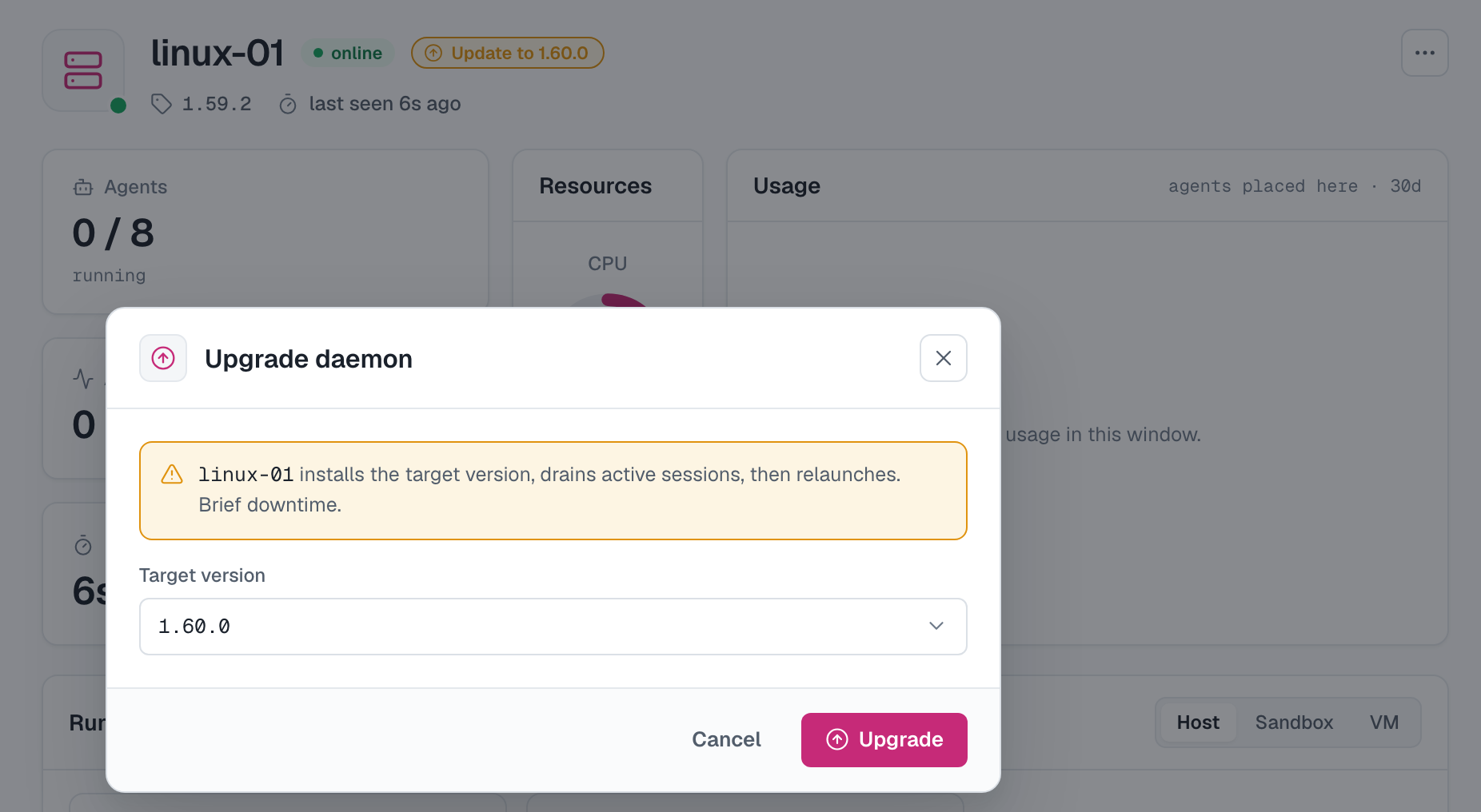
This requires standard daemon edit permission: any Owner or Collaborator who can see the daemon can run it. Viewers can't.
The Control Plane only sends the target version. The CLI on the host still handles the registry lookup and package download. The daemon installs the target release, updates current, drains active work, and exits with a planned restart code so its supervisor launches the new version. The status shows Upgrading until the daemon is ready again.
An upgrade counts as complete only when the daemon reconnects and reports the requested version, so an old release restarting won't be mistaken for a completed upgrade. Only one lifecycle operation can run on a daemon at a time.
Two limits to keep in mind:
- No process-level automatic rollback on remote upgrades: Once the old daemon exits, recovery has to happen on the host. See Roll back. A local
upgrade --restartrolls back automatically. - The console only offers Upgrade while the daemon is online: For an offline or stuck daemon, upgrade it from the host or queue an upgrade through the API reference (
POST /v1/orgs/{orgId}/daemons/{id}/upgrade). A queued upgrade runs on the daemon's next authenticated connection before full startup, which lets you recover a daemon that never reaches ready. Older daemons that predate this feature need an online connection or a host-side upgrade.
Upgrade automatically
A daemon with Auto-upgrade enabled tracks the release offered by the console without anyone clicking Upgrade. Configure it per daemon: open the daemon from Infra and toggle Auto-upgrade next to the version at the top of the page. Changes take effect right away. Hover over the switch to see details of the last automatic upgrade (also indicated by the icon beside it).
The daemon downloads the new release while continuing to serve traffic, then restarts onto it once it's idle: no turn or background task running, and none in the last five minutes. Automatic upgrades never cut a turn short.
- Staggered rollout: On the stable channel, each daemon waits a fixed delay of up to two hours after a release is published so a faulty release doesn't reach every daemon at once.
- Failed launches are skipped: If the new release fails to start, the daemon reverts to the previous version and skips the bad release going forward.
- Manual downgrades turn it off: Upgrading from the console to any version older than the latest automatically disables Auto-upgrade for that daemon so it won't immediately jump back up.
Auto-upgrade requires a daemon managed by the CLI, either installed as a service or started with agentconnect run. On other daemons the switch is unavailable; hover over it to see why. Toggling it requires the same permission as Upgrade.
To enable Auto-upgrade by default for all newly added daemons, an Owner can turn on Default daemon auto-upgrade in Organization settings. Existing daemons keep their current settings.
Upgrade a service-installed daemon on the host
For a daemon installed as a service, one command handles the whole sequence:
npx -y @agentconnect.md/cli upgrade --restartIt resolves the latest release on your selected channel, installs it, updates current, restarts the service, and runs a health check. If the check fails, it rolls back automatically.
The health check works at the process level: it samples the service over a few seconds and passes only if the daemon stays running on a single stable PID, catching crash loops. Because it doesn't verify Control Plane connectivity, check the daemon's status in the console too after upgrading a connected daemon.
Two behaviors to expect:
- Without
--restart:currentupdates, but the running daemon keeps running its current release until its next restart. Use this to stage an upgrade and pick your own restart window. - With no service installed:
--restartreports that there's nothing to restart and leaves the new release selected. A foregroundagentconnect runapplies it the next time it launches.
Confirm the result:
npx -y @agentconnect.md/cli version list   # channel, installed releases, current, previous
npx -y @agentconnect.md/cli status         # service state, PID, log path
If the host runs more than one daemon service, pass --instance <name> to every command so it targets that instance's service and daemon root instead of the default.
Choose a version or a channel
npx -y @agentconnect.md/cli upgrade --to <version> --restart   # a specific release
npx -y @agentconnect.md/cli upgrade --channel rc --restart     # switch to prereleases
The channel is saved in the daemon root and becomes the default for later upgrades, so --channel changes the tracking channel permanently rather than for a single run. The two available channels are stable and rc.
To canary a release without committing the host to it right away, install it first and activate it later:
npx -y @agentconnect.md/cli version install <version>   # download only; current is unchanged
npx -y @agentconnect.md/cli version use <version>       # switch current, without restarting
npx -y @agentconnect.md/cli restart                     # apply it
Each daemon root keeps its own copies of installed releases, so one instance on a host can test a new version while other instances stay on the previous one.
Old releases
Every install and upgrade prunes older releases afterward, keeping three releases in total by default. The active release and the rollback target are always protected. Pass --keep <n> to change the retention count, or --keep 0 to keep all releases.
Cleanup is best-effort and skipped while a daemon is running, because a live daemon may still load files from the bundle it launched with. Releases skipped during an upgrade can be reclaimed later with version prune.
Roll back
If a local upgrade --restart fails its health check, the CLI switches back to the previous release, restarts it, and reports the rollback as a failure.
To roll back manually:
npx -y @agentconnect.md/cli version list          # `previous` is the rollback target
npx -y @agentconnect.md/cli version use <version>
npx -y @agentconnect.md/cli restart
In an interactive terminal, a foreground agentconnect run handles startup failures interactively: when the daemon fails to start, it offers to switch back to the previous release, or to re-download the channel's latest release in case the installed bundle is corrupt, and retries. A background service never prompts, since its supervisor needs to see the real exit code.
Upgrade the CLI
npx resolves the package each time it runs, so pin @latest when you want to be sure you aren't reusing a cached older CLI:
npx -y @agentconnect.md/cli@latest version listOn a machine running a background service, install the CLI globally instead. That gives the CLI a stable path on disk for the service definition:
npm install -g @agentconnect.md/cli@latest
agentconnect status
The CLI requires Node.js 24.12 or newer, the same minimum version as the daemon.
Reinstall the service after the CLI or Node moves
The OS service supervises the CLI, and the CLI supervises the daemon. When you install the service, it records the Node executable and the CLI entry path present at that time, and it doesn't re-resolve them later. It does re-resolve current on every launch, which is why daemon upgrades need no service changes.
Reinstall the service after anything that changes either path, such as a Node upgrade, switching Node version managers, or moving the CLI to a different install path (especially switching from npx, whose files live in the npx cache, to a global install).
Run the command using the exact CLI you want the service to use from then on, since that's the entry path it records:
agentconnect install-service   # rewrites the definition in place
agentconnect restart           # `up` if the service is currently stopped
Reinstalling the same instance is idempotent. install-service only writes the service definition and doesn't start anything.
A stale definition usually shows up as a service failing to start after a Node upgrade, or breaking after the npx cache is cleared. Run agentconnect status to find the log path and confirm.
Good to know
- Upgrades drain within a grace period: The daemon stops accepting new turns and waits for in-flight work to finish (25 seconds by default for ordinary local work), then cancels anything remaining and stops its runtimes. While this avoids an abrupt kill, long-running turns can still be interrupted, so pick your upgrade window accordingly. Expect the daemon to be briefly unreachable while it relaunches.
- Keep runtimes current too: Agent runtimes on the host are upgraded with their own tools, not by the daemon. Some AgentConnect safeguards rely on flags only available in newer runtime releases; see What a runtime sign-in brings. Restart the daemon after changing a runtime installation or the service user's
PATH. - Kubernetes installs upgrade differently: An install-wide daemon pool moves with its Helm release instead of these commands. See Kubernetes operations.
How is this guide?