Daemon groups
Let multiple daemons share agents so an agent keeps running when one machine goes down and its sessions can run across multiple machines.
Kubernetes is the recommended way to run agents at scale. The Kubernetes deployment is built for production: its install-wide daemon pool keeps agents running across replaceable nodes, and every session runs in its own sandbox pod against one shared store with no per-machine setup. Use daemon groups when your agents run on machines you operate yourself.
A daemon group is a named set of daemons connected to your organization. Placing an agent on a group instead of a single daemon gives you two separate capabilities:
| Feature | What it does | How you turn it on |
|---|---|---|
| Failover | One member serves the agent at a time. When that member stops, another member takes over. | Create a group with two or more daemons and place the agent on it. |
| Parallel sessions | The agent's isolated sessions can run on other members of the group, not just on the serving member. | Turn on Spread sessions across the group for the group, and enable sandbox.share on each machine that should run them. |
Failover works on its own without parallel sessions. Parallel sessions build on failover and apply only to agents placed on a group.
Before you start
Create a group. Open Infra, go to Daemon groups, and choose New group. Give it a name, select its daemons, and leave Spread sessions across the group off unless you're setting up parallel sessions. A daemon can belong to only one group at a time. You can also add or remove a daemon from its own page using Join <group> and Leave <group>.
Joining a group doesn't move existing agents. Agents placed directly on that daemon keep running there and appear as pinned on the group's page. Leaving a group hands off the group's agents to its remaining members.
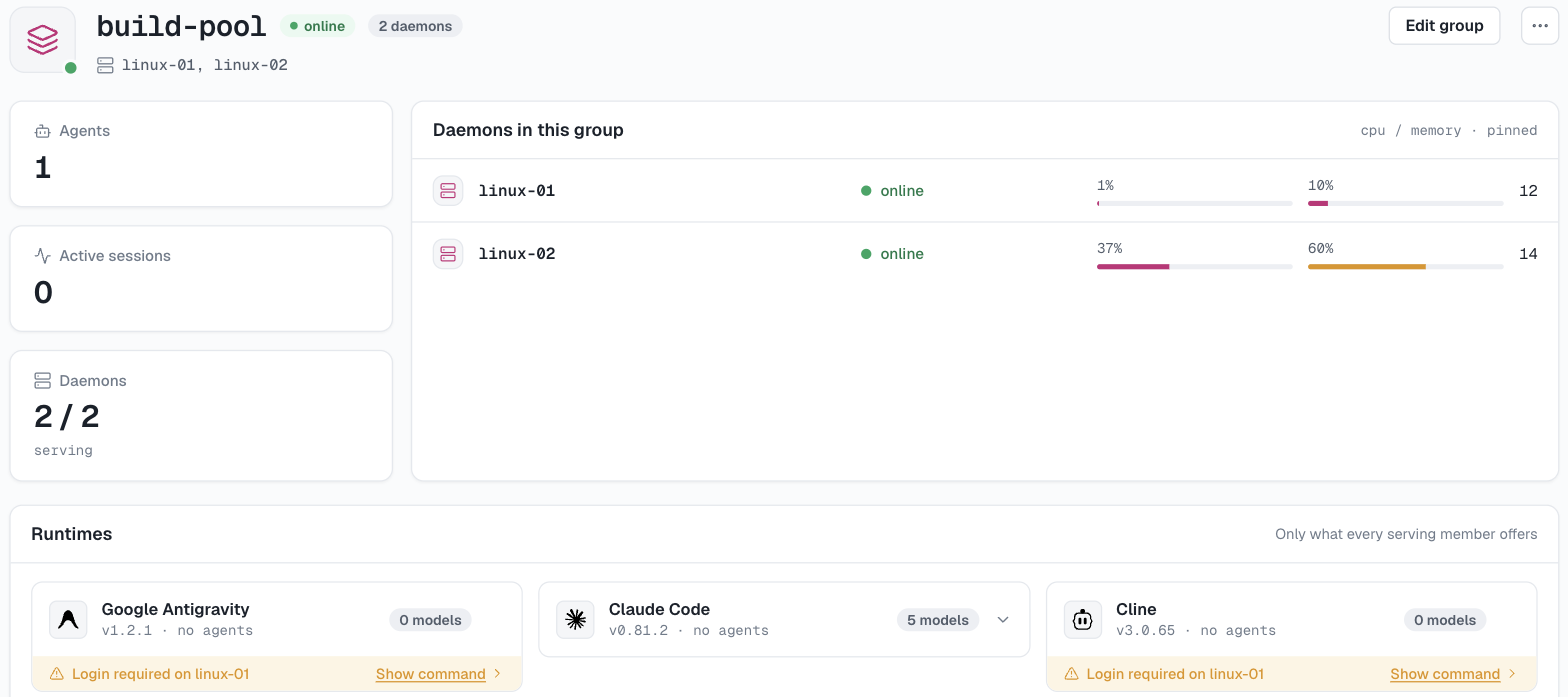
The group's page shows its members, which member is serving, the agents placed on the group, and its active sessions. Runtimes lists only the runtimes available on every serving member, since a group agent can run on any serving member.
Failover
What it does
An agent placed on a group is served by one member at a time. That member handles its turns, maintains its chat platform connections, and runs its schedules and triggers. If that member stops serving, another member takes over, installs the agent if needed, and keeps going:
- A restart or upgrade drains the member first, so another member takes over as soon as the drain finishes.
- A member that drops unexpectedly (from a crash, power loss, or network outage) keeps the agent until its lease expires, after about two minutes. Then another member takes over.
The agent stays on the member that took it over. It won't move back when the previous member returns, and agents aren't rebalanced across members.
Set it up
- Connect two or more daemons and create a group with them.
- Make sure every member can run the agent: each member needs the agent's runtime installed and signed in, its MCP servers available, and its execution strategy supported. The group's Runtimes list shows what every serving member offers. The Execution strategy picker is broader and lists every strategy offered by at least one serving member. If a session lands on a member that doesn't support the agent's strategy, that member rejects it instead of falling back to a weaker isolation boundary.
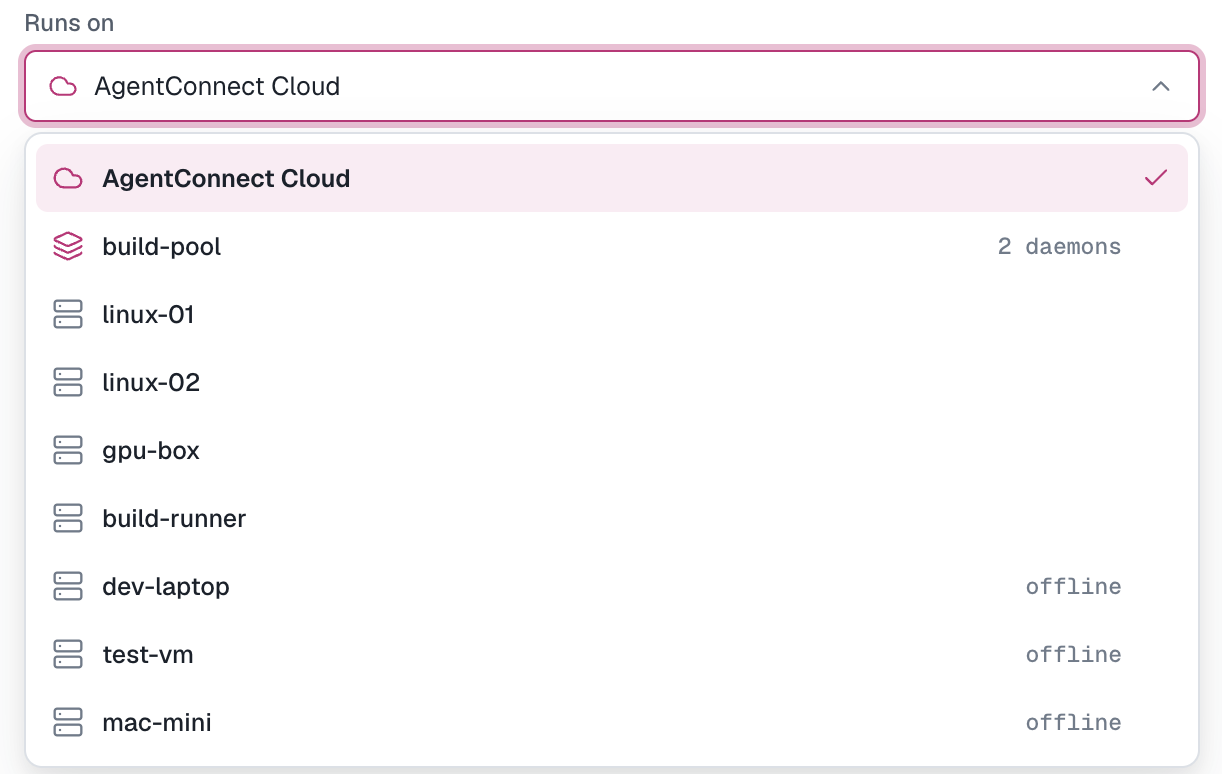
- Place the agent on the group: in the agent's Configuration, pick the group under Runs on. The picker notes: "Any daemon in the group can serve this agent."
You can also create a new agent directly on a group.
What carries over and what doesn't
| Carries over to the new member | Stays on the member that ran it |
|---|---|
| The agent's saved definition, integrations, schedules, and triggers | Conversation transcripts and each session's runtime state |
| Managed memory (stored in AgentConnect for group agents) | The runtime's own native memory |
| GitHub, GitLab, and Gitea workspaces (cloned again on the new member) | Scratch workspaces, and uncommitted work in any workspace |
In practice, continuing a conversation after a failover starts a fresh runtime session on the new member. A webchat conversation that ran on the previous member tells you this happened instead of replying without its history. Commit and push any work you want to survive a failover.
For group agents, managed memory is always stored in AgentConnect instead of on a single daemon, so every member sees the same memory.
Optional: share session history
By default, each member stores its sessions in its own local database. You can configure members to share a single PostgreSQL database instead, so session records and transcripts stay visible regardless of which member serves the agent. Create a connection file in the daemon's root directory alongside config.json:
{ "version": 1, "databaseUrl": "postgresql://agentconnect:<password>@db.example.test:5432/agentconnect", "maxConnections": 4 }Then point the daemon to it in config.json:
{ "store": { "backend": "postgres", "configFile": "data-plane.json" } }Apply this configuration to every member pointing at the same database, and restart each daemon. Restrict permissions on the connection file so only the daemon's OS user can read it.
- The store setting is per machine, so it applies to every agent on that daemon, not just group agents.
- It requires the Control Plane. Agents defined only in the machine's local agents directory aren't served on it.
- Existing local data isn't migrated: a daemon switched to PostgreSQL starts without its previous local history.
- A shared store preserves session records and transcripts, not runtime process state. A session whose runtime ran on the previous member still starts a fresh runtime session after failover, unless it was running on another member via parallel sessions.
Parallel sessions
What it does
Without parallel sessions, every session of an agent runs on the member serving it. With parallel sessions enabled, each new isolated session is placed on whichever member will be least loaded after adding it, based on each machine's session capacity. Members already at capacity are skipped, and ties stay on the serving member. When all machines have the same capacity (the default), new sessions simply go to the member running the fewest isolated sessions. A session stays on its assigned machine for its entire lifetime, while the serving member continues handling the conversation and relaying traffic to that machine.
How a session runs on another machine depends on the agent's Execution strategy:
| Execution strategy | Session on another member |
|---|---|
host | A process on that machine in its own session directory (Linux only). |
microsandbox | A microsandbox VM on that machine (requires microsandbox there). |
srt | An SRT sandbox on that machine (requires srt there). |
Requirements
- The agent is placed on a group (failover is set up).
- Each session has its own workspace: Worktree is enabled (labeled Session isolation when the agent's execution strategy is a sandbox). Sessions sharing a single workspace always stay on the serving member.
- Each member lending capacity supports the agent's execution strategy, has the agent's runtime signed in, and has the agent's model available. Members that don't match are skipped.
- Members can reach each other directly over TCP. A lending member listens on a dynamically chosen port on all interfaces at startup, and peers connect using the IP address that daemon uses to reach AgentConnect. Allow inbound connections between group members on your firewall.
Turn it on
Parallel sessions require opting in at two levels:
-
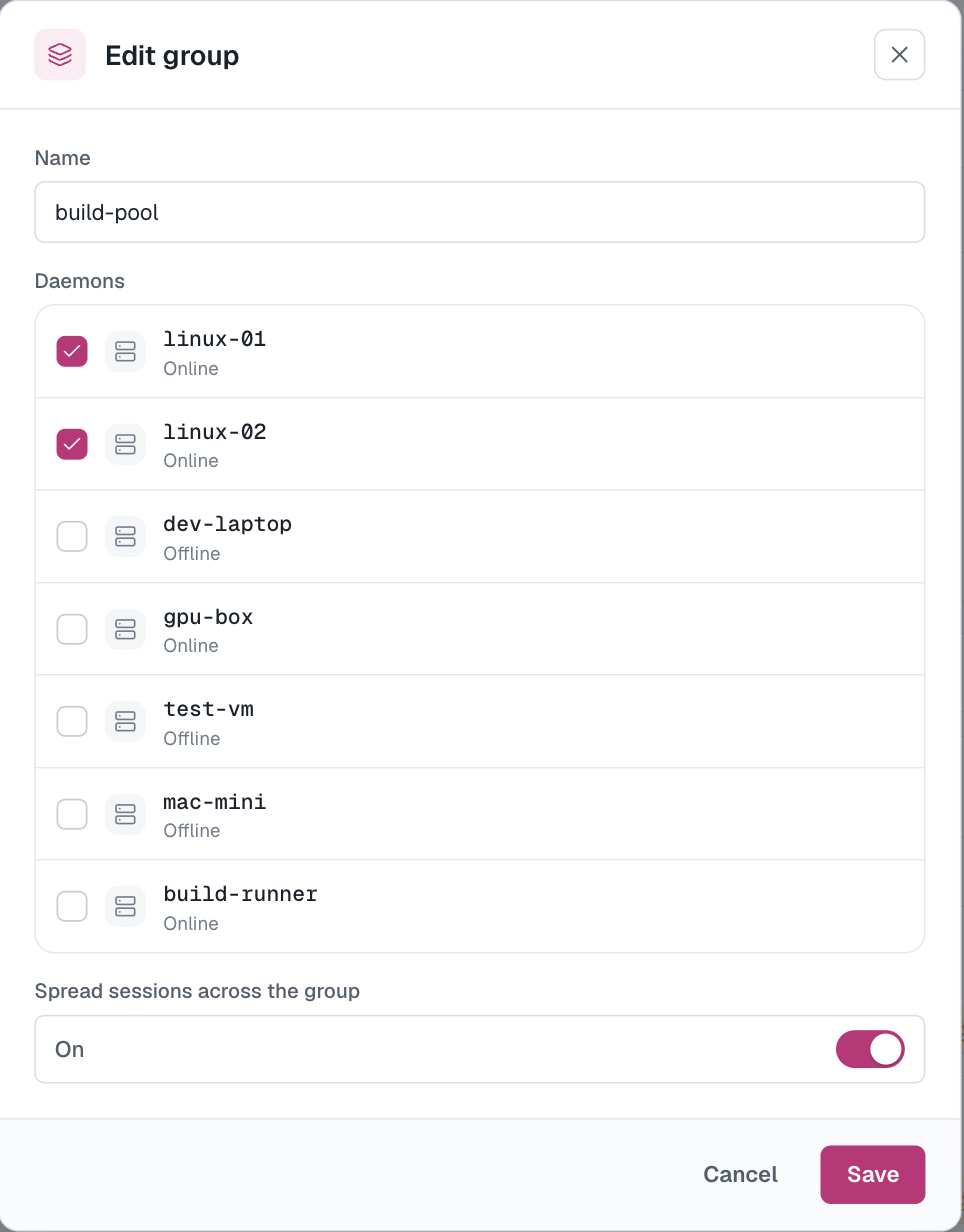
The group: Open Edit group and turn on Spread sessions across the group. When off, sessions never run on other members.
-
Each machine lending capacity: On every member that should run sessions for other members, add this to its
config.jsonand restart the daemon:{ "sandbox": { "share": true } }Because this is the machine owner's call, it lives only in the local config file, is read on daemon startup, and can't be changed from the console. It's off by default.
A member without sandbox.share still serves group agents and runs its own sessions; it just won't run sessions for other members.
Size each machine
Each member's session capacity is set by limits.maxConcurrentSessions in its config.json (32 by default). This caps how many sessions the machine runs for its group (including its own isolated sessions) and determines its share of new sessions. When group members have different hardware, set proportional capacities and restart each daemon. For example, a large workstation alongside two smaller machines:
| Machine | config.json |
|---|---|
| 128 GB workstation | { "limits": { "maxConcurrentSessions": 8 } } |
| 32 GB machine | { "limits": { "maxConcurrentSessions": 2 } } |
| 16 GB machine | { "limits": { "maxConcurrentSessions": 1 } } |
With those settings, the workstation receives the largest share of new sessions. Like sandbox.share, capacity is a local setting for the machine owner and can't be configured from the console. Reaching capacity only rejects sessions from other members; a member's own sessions still run on it.
What sharing a machine lends
- Its runtime sign-in: A session running on a lending machine uses that machine's runtime login or API key setup (for example, its Codex or Claude sign-in) and its sandbox settings. The agent's provider credentials, secrets, and repository credentials still come from the serving member over an encrypted connection. Only enable sharing on machines whose runtime accounts you're comfortable letting the group's agents use.
- CPU, memory, and disk, up to the machine's session capacity.
- One network port, as described in Requirements.
See where a session runs
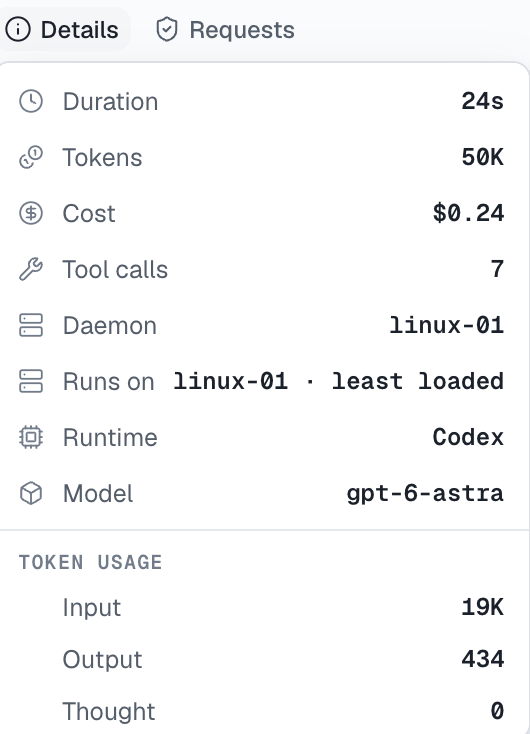
A session's Details panel shows Runs on with the machine running it. If a session stayed on the serving member, it also shows why:
| Reason | Meaning |
|---|---|
| not on a group | The agent is placed on a single daemon instead of a group. |
| spreading off | The group's Spread sessions across the group switch is off. |
| shared workspace | The session uses the agent's shared workspace instead of its own. |
| least loaded | The serving member was the least full relative to its capacity. |
| no member could run it | No lending member meets the session's requirements. |
| every member full | Every lending member is at its session capacity. |
| control plane unreachable | Placement couldn't be decided at the time. |
If a lending machine goes away
A session started on another machine stays bound to that machine. If that machine goes offline briefly, turns fail with a retryable error. If it remains offline for more than about 10 minutes, the session restarts on another member without any uncommitted work that was on the lost machine.
Limitations
- Agents aren't rebalanced after a failover, and a returning member doesn't reclaim its previous agents.
- Without a shared PostgreSQL store, conversation history doesn't follow an agent to a new member.
- Machines lending capacity must run Linux, reach each other directly, and allow the lending port through their firewalls. The port isn't fixed.
- A multi-homed machine advertises the address it uses to connect to AgentConnect. There's no override yet.
How is this guide?