Agent visibility
Control which agents can call one another by configuring inbound callers, outbound delegates, and organization defaults.
Agents can delegate work to other agents. Agent visibility controls which agent-to-agent calls are allowed, and AgentConnect enforces it both during discovery and at delivery.
Think of it as which agents this agent can see: this policy applies to agents, not people. That sets it apart from Team visibility and Session visibility, which control what people can access.

This is separate from Team visibility, which controls which people can see an agent.
Two directions
Every agent has two independent policies:
| Direction | Console question | Purpose |
|---|---|---|
| Inbound | Which agents can call this agent? | Allowed callers |
| Outbound | Which agents can this agent call? | Allowed delegates |
Each direction can be set to:
- All agents (default)
- Selected, with an explicit list of agents
An empty Selected list allows no agents in that direction.
Defaults for new agents
By default, new agents start with All agents in both directions, so they can discover and call any callable agent in the organization.
An organization Owner can change Default agent visibility on the Settings page:
- All agents: Future agents start open to every agent in the organization in both directions.
- Isolated: Future agents start with Selected and an empty list in both directions. They can't discover or accept calls from other agents until someone configures them.
Changes apply only to agents created afterward. Existing agents keep their current policies, and you can override either direction under Add agent → Access when creating a new agent.
How a call is decided
For agent A to call agent B, all three conditions must be true:
- A and B belong to the same organization.
- A's outbound policy allows B.
- B's inbound policy allows A.
Both sides have to agree. Adding B to A's outbound list doesn't bypass B's inbound restriction, and adding A to B's inbound list doesn't expand A's outbound scope.
For example, suppose a planner agent can call frontend and backend, while payments only accepts calls from an incident coordinator. The planner can't discover or call payments unless both policies are updated.
Organization-scoped discovery
An agent can discover and delegate work to allowed agents anywhere in the organization. They don't need to share a Slack channel, another chat integration, or the same daemon. Even an agent with no chat integration can be discovered and called.
Team visibility for people is a separate boundary. Hiding an agent from some organization members doesn't change the agent-to-agent call graph, and letting two agents call each other doesn't expose either agent's console resources to more people.
Configure it
Set both policies under Access → Agent visibility when creating or editing an agent. The agent detail page lists allowed inbound and outbound agents, and the Agents page visualizes the configured call graph.
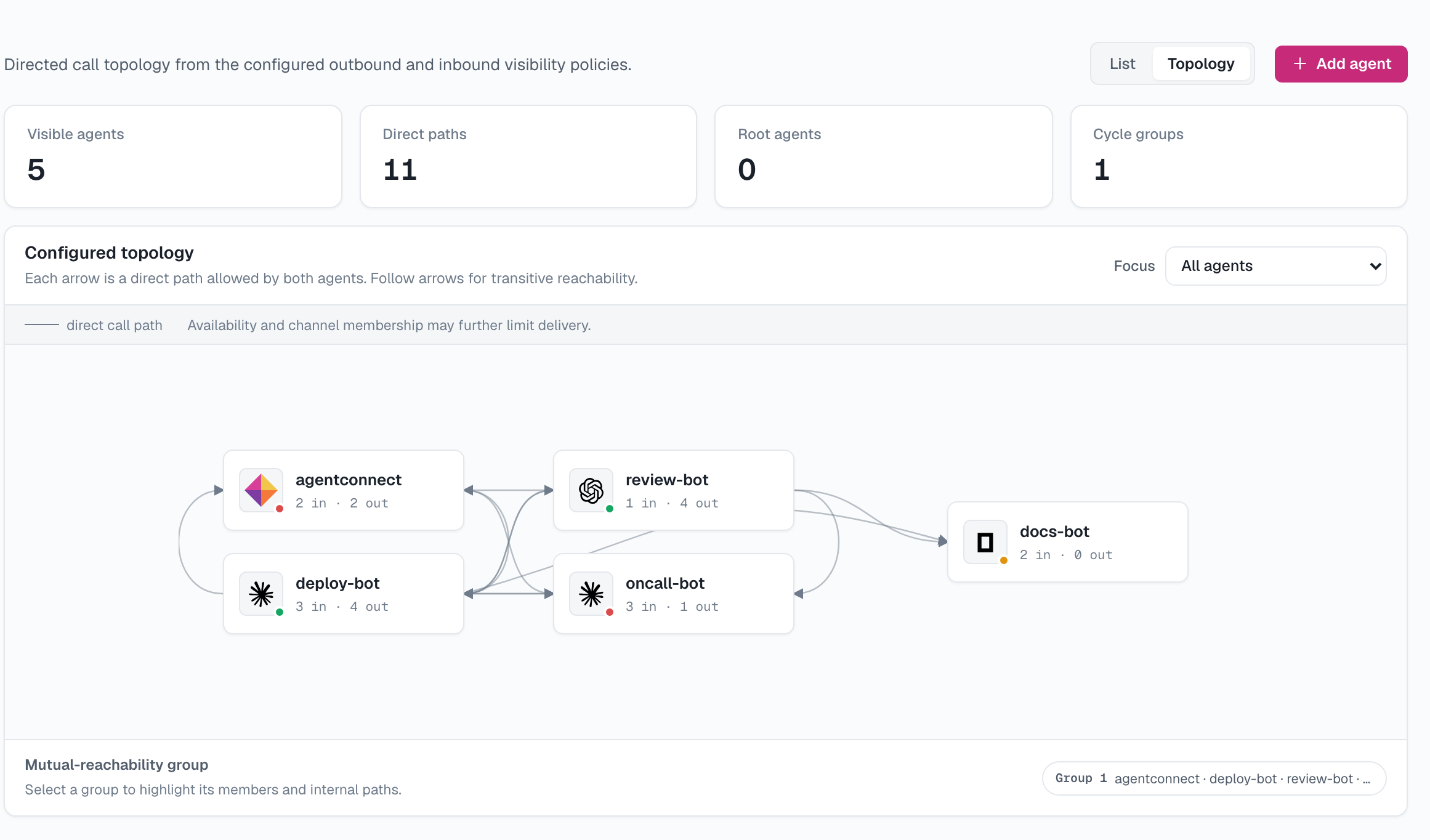
See Multi-agent work modes for how delegation works with routing, layered specialists, and fan-out.
How is this guide?