Webhooks
An HTTPS endpoint that turns any POST request into an agent session, from your own scripts or from an existing system with a fixed payload format.
A webhook integration gives an agent an inbound HTTPS endpoint. Anything that can send a JSON POST request (CI pipelines, monitoring tools, a cron job on another machine, or your own app) can trigger the agent.
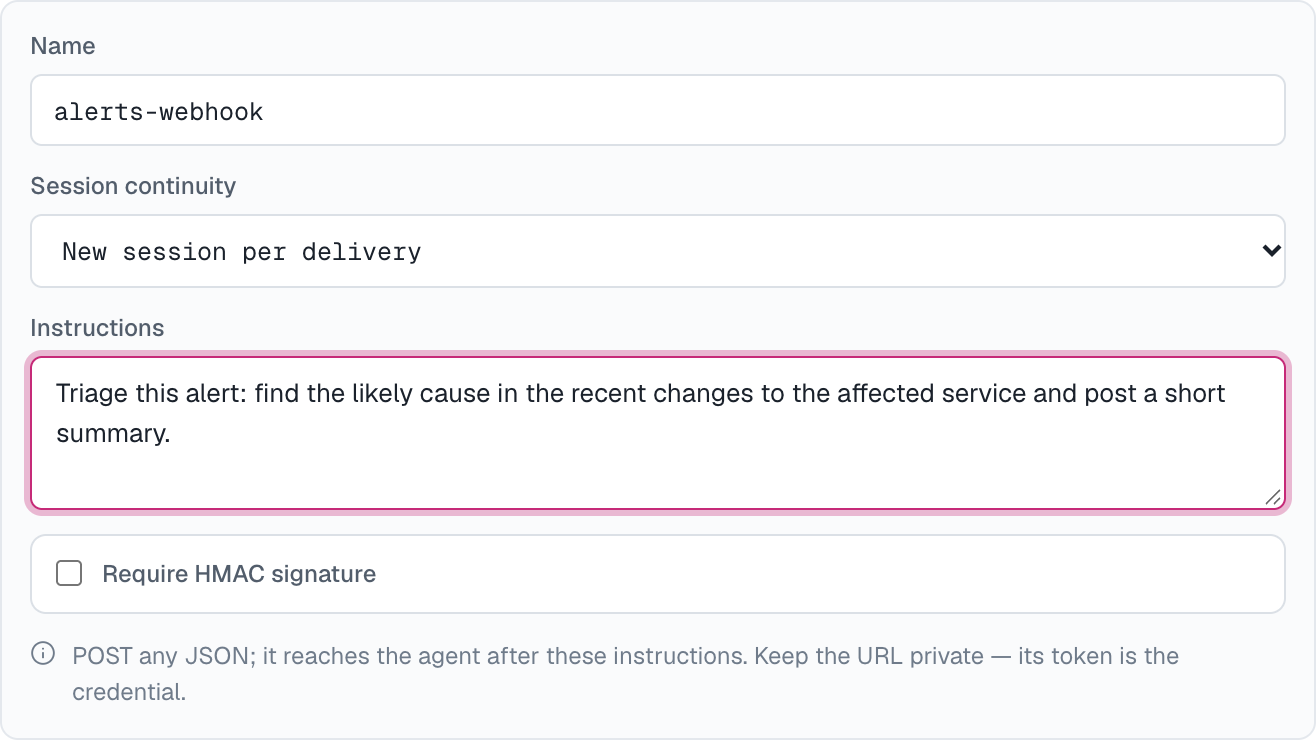
Create one
On your agent, open Integrations → Add integration → Webhook and configure:
- Name: Defaults to
<agent>-webhook. - Session continuity: Controls which deliveries share a session (see Sessions).
- Instructions: Optional. Tells the agent what to do with each delivery. Leave this empty when the sender writes the prompt itself; fill it in when the sender is an existing system whose payload format you can't change (see Two ways to tell the agent what to do).
- Require HMAC signature: Optional. Adds a signing secret on top of the endpoint URL.
Click Create to view:
- Inbound endpoint: The
POSTURL for this integration. Its embedded token acts as the credential, so keep the URL private. - Signing secret: Shown only when you require a signature. It's shown only once, so copy it now.
- Send a test delivery: A ready-made curl command with an editable message, letting you send a test before writing any code.
To change the instructions later, click the pencil button on the webhook's row in the agent's Integrations card.
Two ways to tell the agent what to do
The sender writes the message. Leave Instructions empty. The agent reads the first string field present among prompt, text, or message in the request body as its instruction, and receives every other field as context. If none of those fields are present, the entire request body is handed over as-is. Use this mode when you control the sender (a CI step, a script, or your own app). Put the instruction before large logs or diagnostic payloads:
curl -X POST "$WEBHOOK_URL" \
  -H "content-type: application/json" \
  -d '{"message":"Deploy of api-server v2.31 failed on step migrate — investigate and summarize.","log_url":"https://ci.example.test/runs/1234"}'
The webhook defines the instructions. Fill in Instructions, for example "Triage this alert: find the likely cause in the service's recent changes and post a short summary." Every delivery then reaches the agent as those instructions followed by the full request body, which the agent treats as data rather than instructions (no individual field is extracted). Use this mode to connect an existing system with a fixed payload format (such as an alerting tool, an error tracker, or a form service) straight to the agent. Because text relayed by these systems (like error messages or alert descriptions) can come from external users, keeping the instructions on the webhook ensures the request body isn't treated as instructions.
Instructions can be up to 8,000 characters. In both cases, the agent's own description still applies.
Sign requests
With Require HMAC signature enabled, every request must include an HMAC-SHA256 digest of the raw request body, keyed with the signing secret and sent as X-AC-Signature: sha256=<hex>:
BODY='{"message":"Nightly import finished with 3 rejected rows — summarize them."}'
SIG=$(printf '%s' "$BODY" | openssl dgst -sha256 -hmac "$WEBHOOK_SECRET" -r | cut -d' ' -f1)

curl -X POST "$WEBHOOK_URL" \
  -H "content-type: application/json" \
  -H "X-AC-Signature: sha256=$SIG" \
  -d "$BODY"
A request with a missing or invalid signature is rejected the same way as an unknown URL.
Sessions
Session continuity controls which deliveries share context:
- New session per delivery (default): Every POST starts its own session.
- One session per subject: Deliveries with the same
X-AC-Session-Keyheader value continue the same session, so a ticket, order, or conversation builds up context across events. A delivery without that header starts a session of its own. - One shared session for the whole hook: Every delivery continues the same session.
Each session appears in Sessions with the webhook listed as its trigger and the full transcript included. The webhook's row on the agent page shows when it last fired, and its history button lists recent deliveries with their outcomes and linked sessions.
Request reference
| Method and type | POST with content-type: application/json |
| Body size | Up to 128 KiB. The agent reads the first 64 KiB and is notified when a body was truncated. |
X-AC-Delivery-Key | Optional, up to 200 characters. Identifies a single delivery so retries with the same key are deduplicated instead of running twice. Generated automatically when omitted. |
X-AC-Session-Key | Optional, up to 200 characters. Groups deliveries into one session when the webhook uses One session per subject. |
X-AC-Signature | sha256=<hex>. Required only when the webhook requires a signature. |
202 | Accepted. The response body is {"deliveryKey":"…"}, and the agent runs after the response. |
404 | Unknown URL, or a missing or invalid signature. |
429 | Too many deliveries for this webhook (bursts of 10, then about one per second). Retry later with the same delivery key. |
Tips
- Pair webhooks with a GitHub workspace so the agent can inspect the code referenced in the payload.
- To rotate the URL and secret, delete the webhook integration and create a new one. Editing a webhook doesn't change its URL.
How is this guide?