Connect your personal WeChat to an AgentConnect agent by scanning a QR code, and message the agent as a private contact.
The WeChat integration connects your personal WeChat account to an agent. After you scan a QR code in the Console, the agent appears as a private contact under WeChat's ClawBot plugin. It can't join groups, and no one else can message it. For a bot your whole team can talk to, use WeCom.
WeChat works on both AgentConnect Cloud and self-hosted deployments.
ClawBot is an experimental feature in WeChat and may change or stop working on WeChat's side.
Because the daemon connects outbound to WeChat, you don't need a public callback URL or any manual credentials. Scanning the QR code completes the setup.
Connect it
-
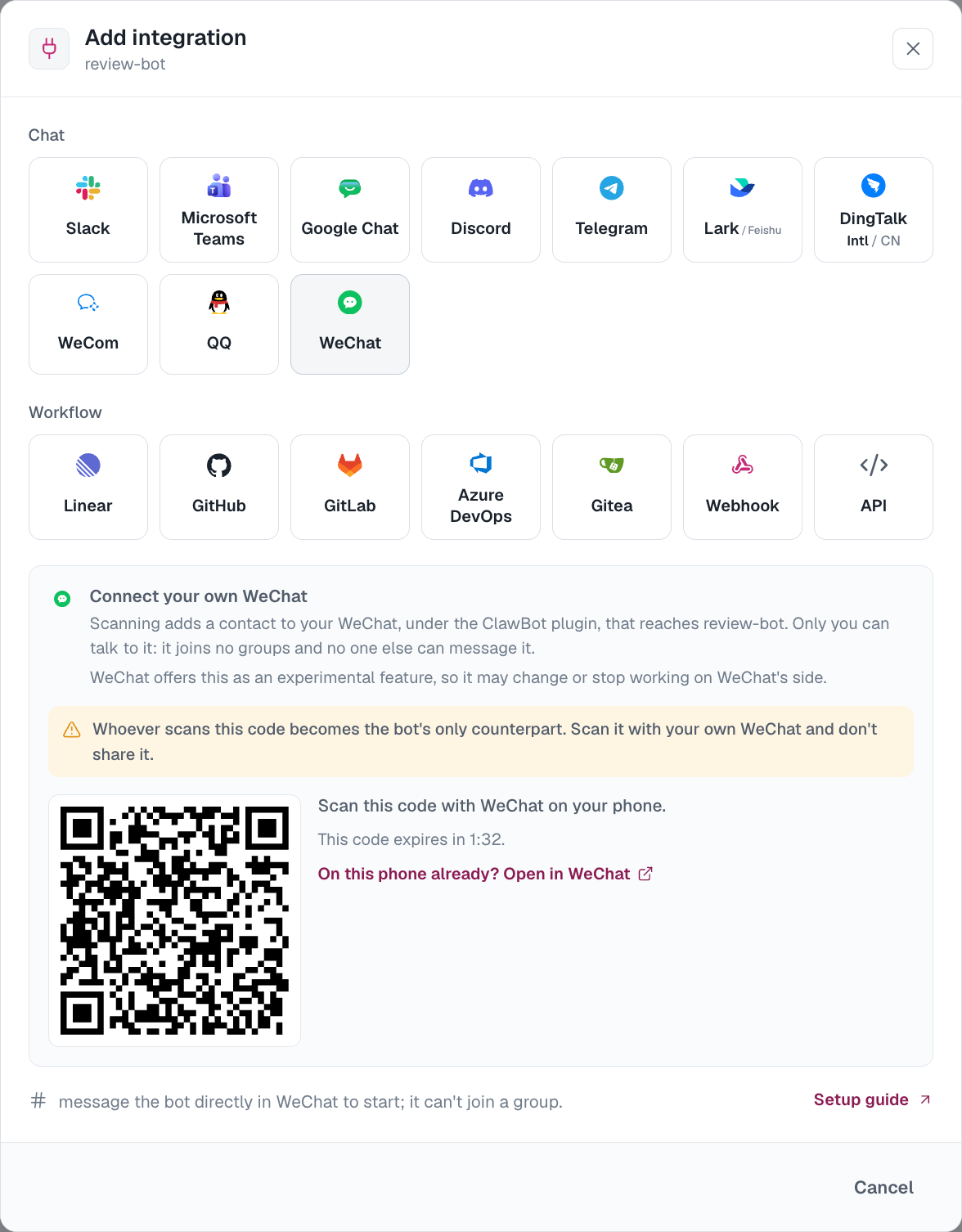
On your agent's page, open Integrations → Add integration → WeChat and click Show QR code.
-
Scan the code with WeChat on your phone. If you're already on that phone, tap On this phone already? Open in WeChat instead. The code expires after about two minutes; refresh it if needed.
-
Tap Confirm in WeChat. If WeChat displays a number on your phone, enter it in the Console.
-
Once the Console shows Connected to WeChat user, open WeChat, find the bot under ClawBot, and send it a message.
Whoever scans the QR code becomes the bot's only chat partner. Scan it with your own WeChat and don't share the code.
Use it
- Chat: Message the bot directly. The chat runs as one ongoing session with the agent, and its sessions in the Console are visible only to you.
- Replies: WeChat displays text verbatim, so replies arrive as plain text with Markdown stripped. Each message arrives complete, a paragraph or more at a time, and long answers are split across several messages in order. Nothing appears while the agent works before its first reply, and WeChat can take several seconds to deliver a message to the agent.
- Files and images: Send the bot an image, file, or video. Voice messages arrive as WeChat's built-in transcriptions. The agent can't send images or files back yet.
- Questions: WeChat doesn't support buttons or cards, so questions that require picking an option can't be asked in chat. The chat gets a notice instead.
- Approvals: When a tool call needs approval, an Agent editor handles it in the Console, and the chat gets a notice.
See In-conversation commands for stopping, cancelling, queuing, and changing supported session settings.
Notes
- If WeChat logs the bot out, it stops answering. Open Integrations → Messaging apps → WeChat → Reconnect and scan again with the same WeChat account. Your integration is kept; the current conversation closes, and your next message starts a new one.
- If the bot moves to another daemon, messages sent during the move are lost.
- Each WeChat bot binds to one agent and one person. Deleting the integration also deletes the bot. To connect again, scan a new QR code.
- When you leave the organization, the WeChat bots you connected are deleted along with your membership.
Self-hosting
WeChat is disabled by default on self-hosted deployments. Enable it with features.wechat in the Helm chart. On Docker Compose, add wechat to FEATURE_FLAGS in compose.env and recreate web. Until the flag is on, WeChat won't appear in the integration picker.
How is this guide?