Discord
Create a Discord application, paste its bot token, and use AgentConnect's ready-made server invite.
The daemon opens an outbound connection to Discord's gateway, so you don't need a public endpoint.
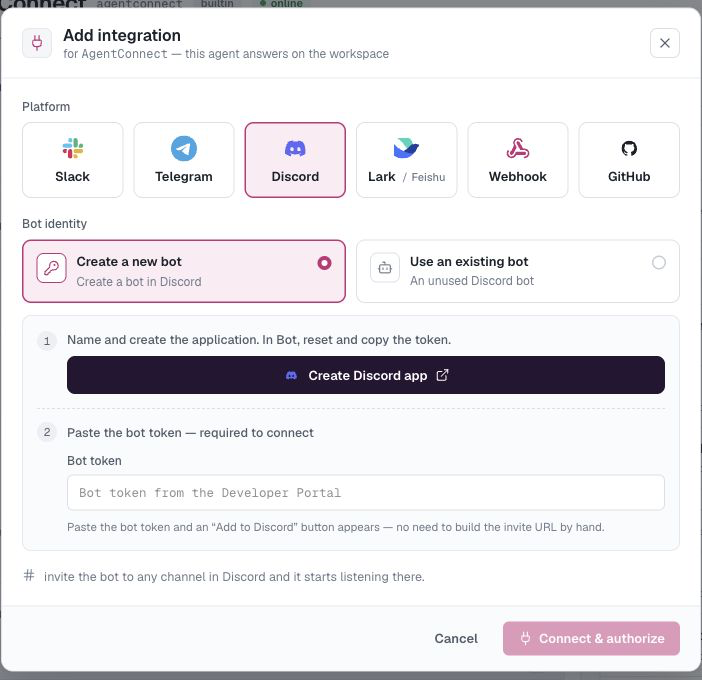
Create the bot
- Open the Discord Developer Portal, click New Application, and give it a name.
- Open Bot and copy the token (click Reset Token if none is shown).
Connect it
On your agent, open Integrations → Add integration → Discord and paste the token. AgentConnect decodes the public application ID from the token and shows Add to Discord with the required bot and applications.commands scopes and permissions, including public-thread creation.
Click Add to Discord, choose the server, approve the invite, and then click Connect.
When you connect, AgentConnect validates the token and automatically turns on the limited Message Content Intent on the Discord application, so you don't need to enable it beforehand. If Discord rejects that automatic update, AgentConnect stops before saving the integration and asks you to enable Bot → Privileged Gateway Intents → Message Content Intent manually.
Use it
Mention the bot in a server channel it can access and it replies. Longer conversations continue in threads. You can also send it a direct message. AgentConnect registers its in-conversation commands as native Discord slash commands.
When a tool call needs approval, the agent posts an approval card in the channel or thread. The agent's What people can do in chat setting controls who can respond.
Notes
- If Discord rejected the automatic Message Content setup, enable the intent manually in the Developer Portal and try connecting again.
- If the bot can't reply or create a thread, use Integrations → Messaging apps → Discord → Add to Discord to reinstall it with the current scopes and permissions.
- Each Discord bot binds to one agent. Deleting the integration frees the bot for reuse.
- When prompted from Discord, the agent can read and post in other channels only through this bot, and only in channels everyone on the server can view. Because AgentConnect can't identify who a Discord user is, it can't hand off requests to Slack or another platform on their behalf. See Reading and posting in other conversations.
How is this guide?