Telegram
One token from @BotFather and your agent answers Telegram DMs and groups.
Telegram is the fastest chat integration to set up. You only need a bot token, with no app review and no public URL, because the daemon connects outbound to Telegram's API.
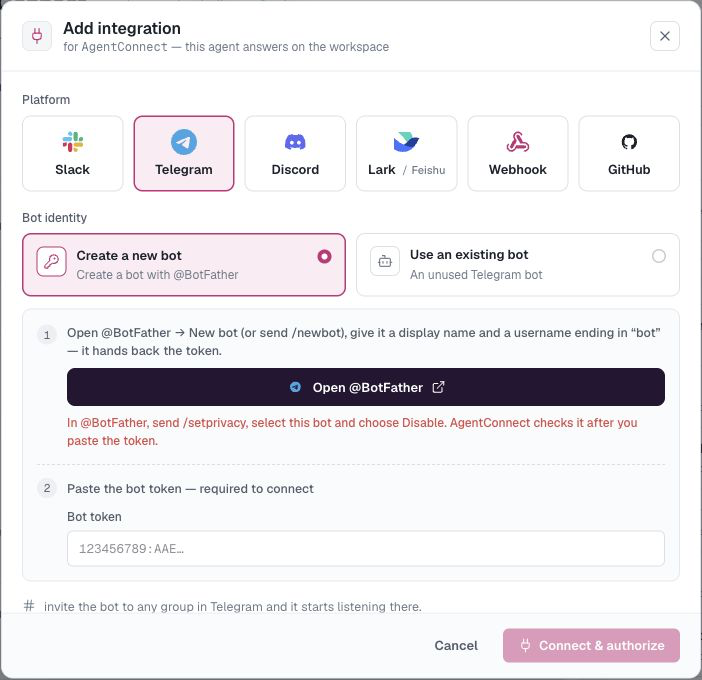
Create the bot
- In Telegram, message @BotFather, send
/newbot, and follow the prompts (first a bot name, then a username ending inbot). - Copy the bot token BotFather replies with (formatted like
123456789:AAE…). - In @BotFather, send
/setprivacy, choose the bot, and select Disable. AgentConnect requires Group Privacy Mode to be off before it connects the bot.
Connect it
On your agent, open Integrations → Add integration → Telegram and paste the token. AgentConnect validates it and checks Group Privacy Mode automatically. If privacy mode is still enabled, the dialog keeps checking while you update the setting in @BotFather. Connect becomes available as soon as Telegram reports that it's off.
AgentConnect checks this setting automatically, but you have to disable it in @BotFather yourself because Telegram's Bot API doesn't let apps turn off Group Privacy Mode.
Use it
- DM the bot: Open
t.me/<your_bot_username>and start chatting. - Groups: Add the bot to a group. With Group Privacy Mode off, you can set its AgentConnect trigger to @-mention or any message. If a group added the bot before you changed privacy mode and regular messages still don't arrive, remove the bot and add it back once.
See In-conversation commands for stopping, cancelling, queuing, and changing supported session settings.
When a tool call needs approval, the agent posts an approval card in the chat, inside its topic or reply chain. The agent's What people can do in chat setting controls who can respond.
Notes
- Each Telegram bot binds to one agent. Deleting the integration frees the bot for reuse (choose Use an existing bot next time).
- Bots and their tokens are managed across your organization under Integrations → Messaging apps → Telegram.
- When prompted from Telegram, the agent can post in other groups only through this bot, and only in groups with a public @username. Because AgentConnect can't identify who a Telegram user is, it can't hand off requests to Slack or another platform on their behalf. See Reading and posting in other conversations.
How is this guide?