WeCom
Connect a WeCom smart bot to an AgentConnect agent for direct chats and group @mentions, with streamed replies, files, and tap-to-answer questions.
WeCom works on both AgentConnect Cloud and self-hosted deployments. Each organization connects a smart bot from its own WeCom workspace. Because the daemon connects outbound using the smart bot's long connection, you don't need a public callback URL. Privately deployed WeCom instances aren't supported.
Create the smart bot
Sign in to the WeCom admin console as an organization admin:
-
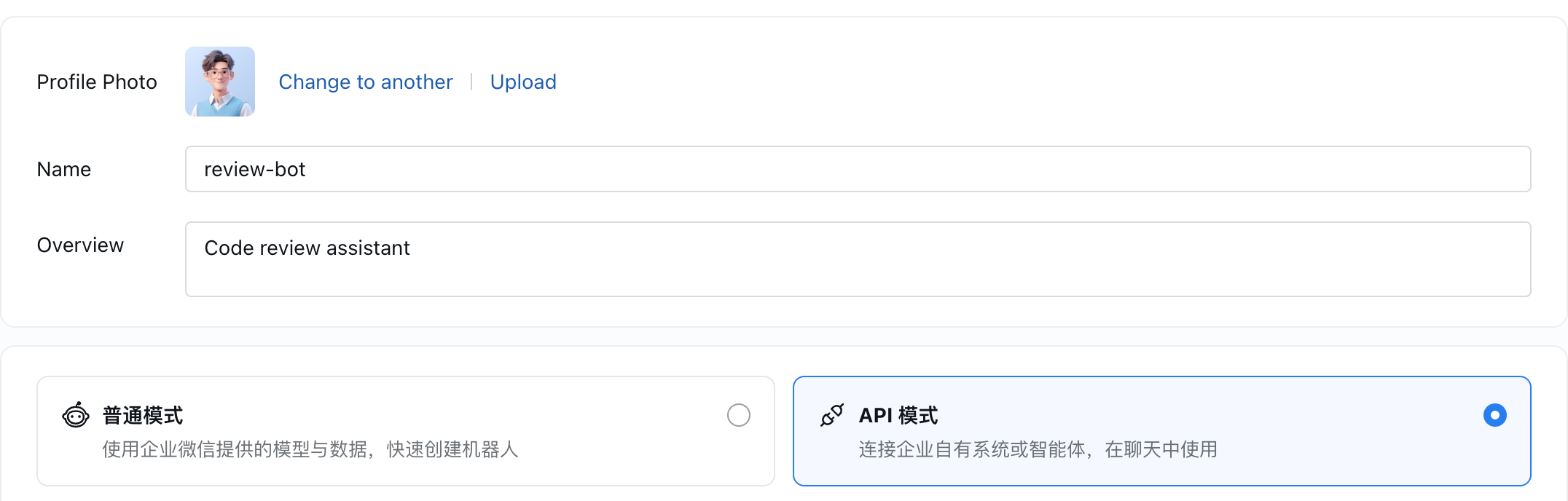
Set the bot's Name, Overview, and Profile Photo to match your agent. WeCom displays these in chats, and AgentConnect can't set them automatically. Then choose API 模式 (API mode).
-
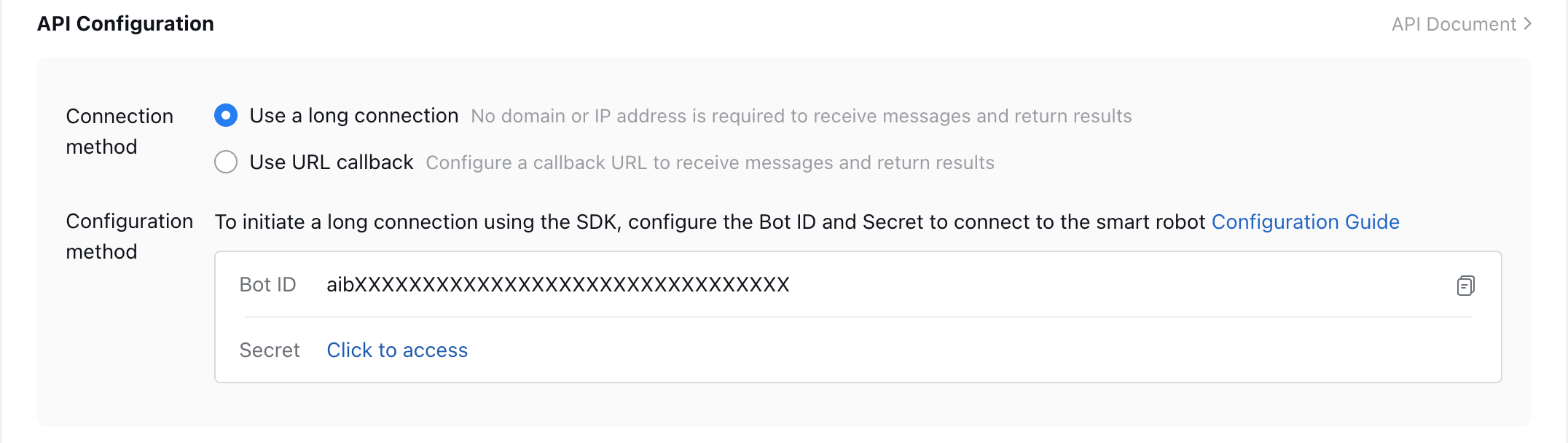
Under API Configuration, keep Connection method on Use a long connection.
-
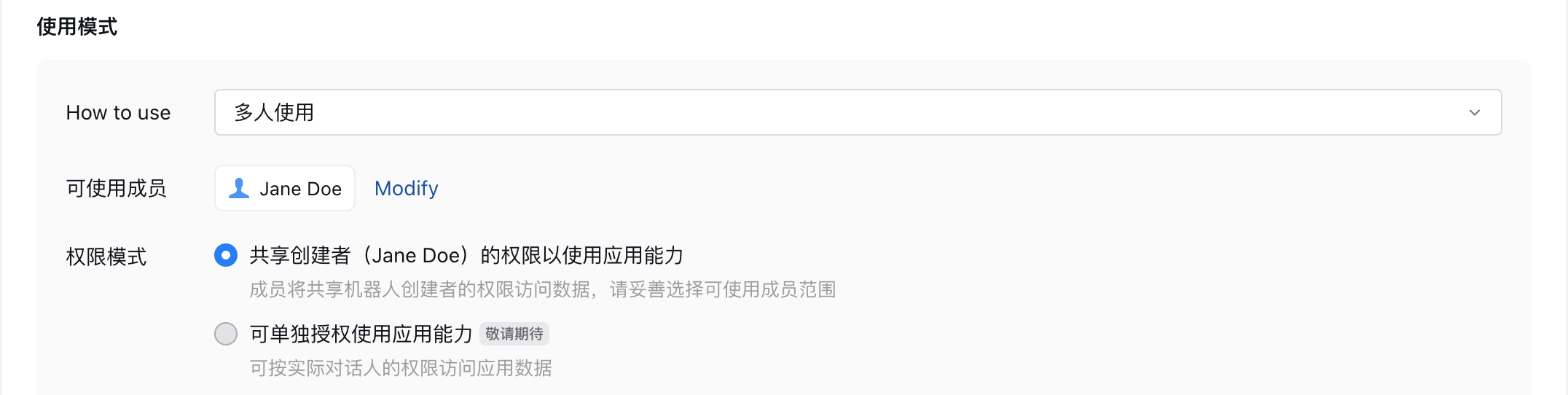
Under 使用模式 (usage mode), change How to use from the default 仅个人使用 (personal use only) to 多人使用 (multiple people), then select who can use the bot under 可使用成员 (members who can use it).
-
Click Save, then copy the Bot ID from API Configuration and click Click to access to get the Secret.
The labels above match the console's English UI (you can switch languages at the bottom of the page). Labels that stay in Chinese in the console are shown as-is with translations.
A smart bot allows only one long connection at a time. Dedicate a bot to AgentConnect; connecting another program to the same bot disconnects the first one.
Connect it
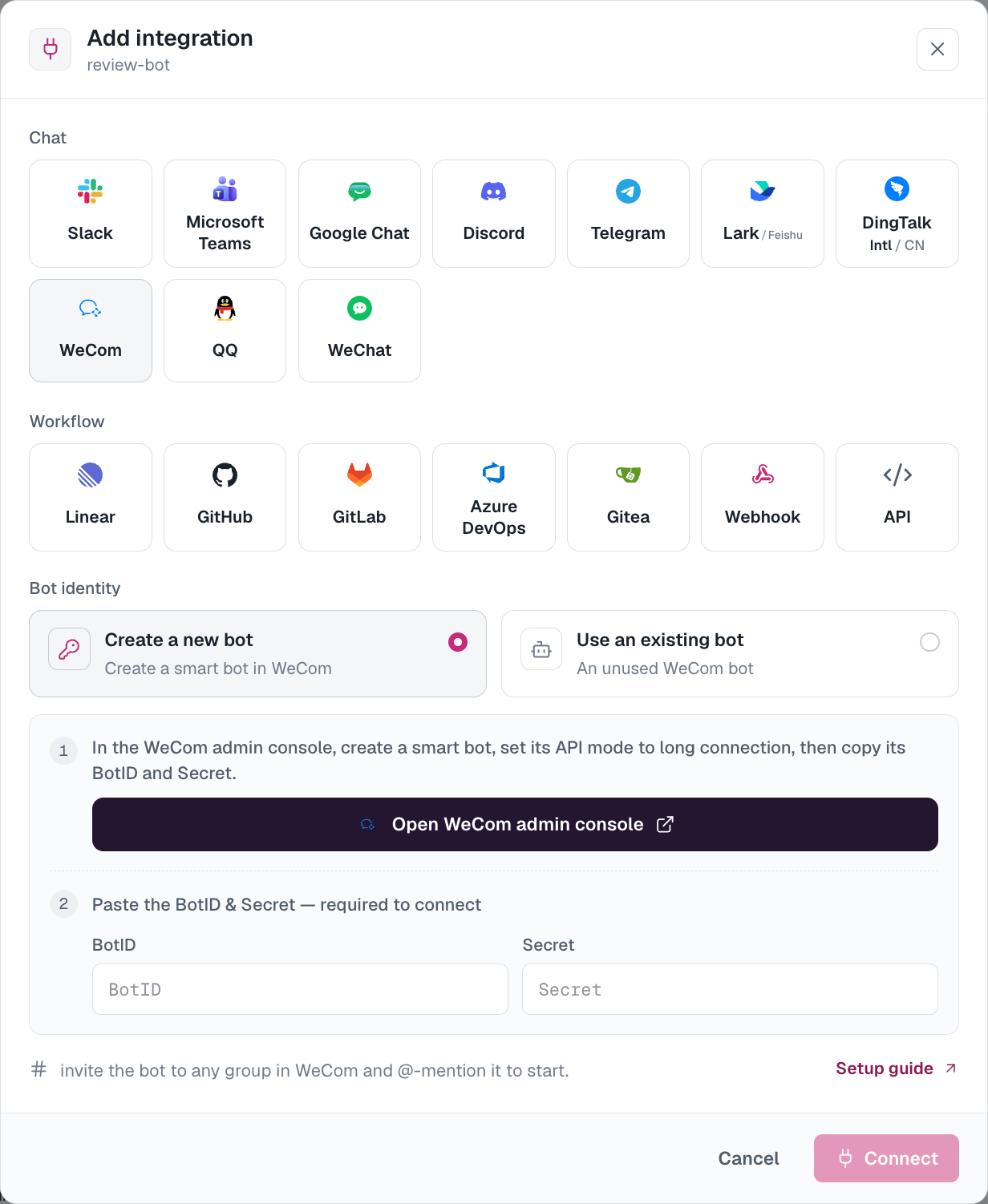
On your agent's page, open Integrations → Add integration → WeCom, paste the Bot ID and Secret, and click Connect. AgentConnect validates the credentials with WeCom before saving them. If the bot isn't configured to use a long connection, validation fails and tells you what to change.
Use it
- Direct chats: Message the bot directly. A direct chat runs as one ongoing session with the agent.
- Groups: Add the bot to a group and @-mention it. WeCom only delivers group messages that mention the bot. Because WeCom groups don't have threads, everyone in the group shares one conversation with the agent. The group's Session mode on the agent's Integrations card decides how the agent organizes work in it.
- Replies: Answers stream in as Markdown while the agent writes. Because WeCom ends a streamed message after ten minutes and caps its size, long answers continue in follow-up messages.
- Files and images: Send an image, file, or video directly in a one-to-one chat. In a group, attach images to the message that mentions the bot, or quote a file while mentioning it. Voice messages arrive as WeCom's built-in transcriptions. The agent can send back images (PNG, JPEG, or GIF, up to 10 MB) and other files (up to 20 MB) from its workspace.
- Questions: When the agent asks you to pick one option, it sends a card you can tap to answer. Questions that don't fit in a card arrive as a numbered list instead. Quote that message and reply with the number (and @-mention the bot in a group).
- Approvals: WeCom doesn't support approval cards. When a tool call needs approval, an Agent editor handles it in the console, and the conversation gets a notice.
See In-conversation commands for stopping, cancelling, queuing, and changing supported session settings.
Notes
- WeCom doesn't share group or member names with smart bots, so the Console lists conversations as
WeCom group · <tag>and people asWeCom member · <tag>, or by account ID when WeCom sends a readable one. - WeCom doesn't provide reactions or typing indicators for smart bots, so the streamed reply itself is the first sign the agent is working.
- WeCom limits a bot to 30 messages per minute and 1,000 per hour in each conversation. Near the limit, streamed updates refresh less often. If WeCom rejects part of an answer, the full text stays available in the session.
- The daemon downloads attachments when they arrive and keeps them for 24 hours. After that, or after a daemon restart, send the file again.
- Groups respond to mentions or stay Off. AgentConnect can't remove the bot from a group; remove it in WeCom instead.
- Each WeCom bot binds to one agent. Deleting the integration frees the bot for reuse (select An unused WeCom bot next time) and doesn't delete the smart bot from WeCom.
- Replace the Secret under Integrations → Messaging apps → WeCom → Replace secret. Because testing the new Secret would disconnect the running bot, AgentConnect saves it without testing. If the bot stops responding afterward, copy the Secret from WeCom again.
Self-hosting
WeCom is disabled by default on self-hosted deployments. Enable it with features.wecom in the Helm chart. On Docker Compose, add wecom to FEATURE_FLAGS in compose.env and recreate web. Until the flag is on, WeCom won't appear in the integration picker.
How is this guide?